# GCP - Basic Information
{% hint style="success" %}
Learn & practice AWS Hacking:[**HackTricks Training AWS Red Team Expert (ARTE)**](https://training.hacktricks.xyz/courses/arte)\
Learn & practice GCP Hacking: [**HackTricks Training GCP Red Team Expert (GRTE)**](https://training.hacktricks.xyz/courses/grte)
Support HackTricks
* Check the [**subscription plans**](https://github.com/sponsors/carlospolop)!
* **Join the** š¬ [**Discord group**](https://discord.gg/hRep4RUj7f) or the [**telegram group**](https://t.me/peass) or **follow** us on **Twitter** š¦ [**@hacktricks\_live**](https://twitter.com/hacktricks_live)**.**
* **Share hacking tricks by submitting PRs to the** [**HackTricks**](https://github.com/carlospolop/hacktricks) and [**HackTricks Cloud**](https://github.com/carlospolop/hacktricks-cloud) github repos.
{% endhint %}
## **Resource hierarchy**
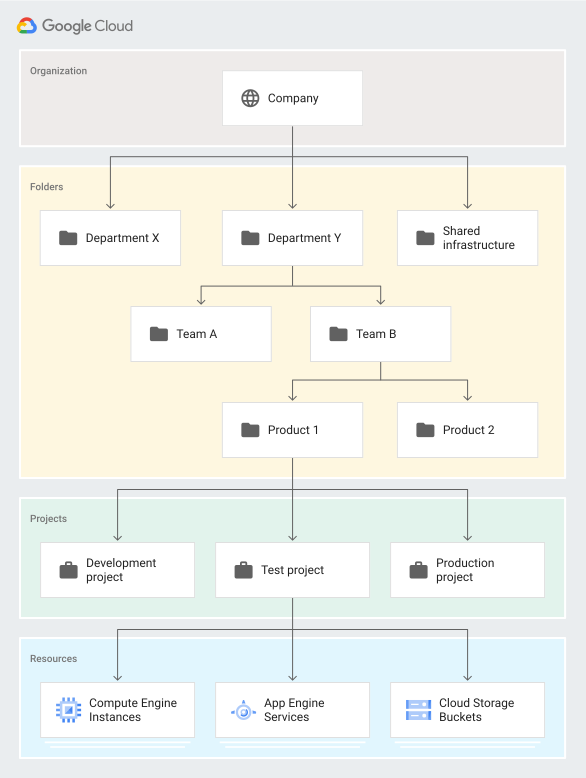
Google Cloud uses a [Resource hierarchy](https://cloud.google.com/resource-manager/docs/cloud-platform-resource-hierarchy) that is similar, conceptually, to that of a traditional filesystem. This provides a logical parent/child workflow with specific attachment points for policies and permissions.
At a high level, it looks like this:
```
Organization
--> Folders
--> Projects
--> Resources
```
A virtual machine (called a Compute Instance) is a resource. A resource resides in a project, probably alongside other Compute Instances, storage buckets, etc.
## **Projects Migration**
It's possible to **migrate a project without any organization** to an organization with the permissions `roles/resourcemanager.projectCreator` and `roles/resourcemanager.projectMover`. If the project is inside other organization, it's needed to contact GCP support to **move them out of the organization first**. For more info check [**this**](https://medium.com/google-cloud/migrating-a-project-from-one-organization-to-another-gcp-4b37a86dd9e6).
## **Organization Policies**
Allow to centralize control over your organization's cloud resources:
* Centralize control to **configure restrictions** on how your organizationās resources can be used.
* Define and establish **guardrails** for your development teams to stay within compliance boundaries.
* Help project owners and their teams move quickly without worry of breaking compliance.
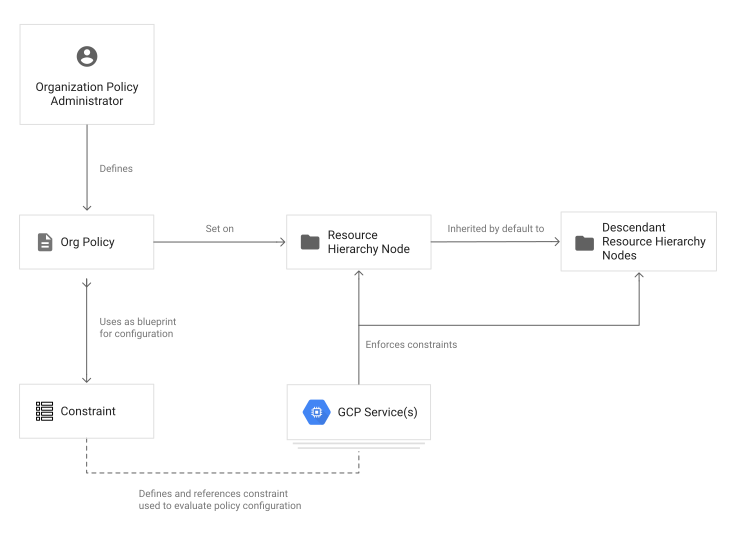
These policies can be created to **affect the complete organization, folder(s) or project(s)**. Descendants of the targeted resource hierarchy node **inherit the organization policy**.
In order to **define** an organization policy, **you choose a** [**constraint**](https://cloud.google.com/resource-manager/docs/organization-policy/overview#constraints), which is a particular type of restriction against either a Google Cloud service or a group of Google Cloud services. You **configure that constraint with your desired restrictions**.
#### Common use cases
* Limit resource sharing based on domain.
* Limit the usage of Identity and Access Management service accounts.
* Restrict the physical location of newly created resources.
* Disable service account creation
There are many more constraints that give you fine-grained control of your organization's resources. For **more information, see the** [**list of all Organization Policy Service constraints**](https://cloud.google.com/resource-manager/docs/organization-policy/org-policy-constraints)**.**
### **Default Organization Policies**
These are the policies that Google will add by default when setting up your GCP organization:
**Access Management Policies**
* **Domain restricted contacts:** Prevents adding users to Essential Contacts outside your specified domains. This limits Essential Contacts to only allow managed user identities in your selected domains to receive platform notifications.
* **Domain restricted sharing:** Prevents adding users to IAM policies outside your specified domains. This limits IAM policies to only allow managed user identities in your selected domains to access resources inside this organization.
* **Public access prevention:** Prevents Cloud Storage buckets from being exposed to the public. This ensures that a developer can't configure Cloud Storage buckets to have unauthenticated internet access.
* **Uniform bucket level access:** Prevents object-level access control lists (ACLs) in Cloud Storage buckets. This simplifies your access management by applying IAM policies consistently across all objects in Cloud Storage buckets.
* **Require OS login:** VMs created in new projects will have OS Login enabled. This lets you manage SSH access to your instances using IAM without needing to create and manage individual SSH keys.
**Additional security policies for service accounts**
* **Disable automatic IAM grants**: Prevents the default App Engine and Compute Engine service accounts from automatically being granted the Editor IAM role on a project at creation. This ensures service accounts don't receive overly-permissive IAM roles upon creation.
* **Disable service account key creation**: Prevents the creation of public service account keys. This helps reduce the risk of exposing persistent credentials.
* **Disable service account key upload**: Prevents the uploading of public service account keys. This helps reduce the risk of leaked or reused key material.
**Secure VPC network configuration policies**
* **Define allowed external IPs for VM instances**: Prevents the creation of Compute instances with a public IP, which can expose them to internet traffic.
- **Disable VM nested virtualization**: Prevents the creation of nested VMs on Compute Engine VMs. This decreases the security risk of having unmonitored nested VMs.
* **Disable VM serial port:** Prevents serial port access to Compute Engine VMs. This prevents input to a serverās serial port using the Compute Engine API.
- **Restrict authorized networks on Cloud SQL instances:** Prevents public or non-internal network ranges from accessing your Cloud SQL databases.
* **Restrict Protocol Forwarding Based on type of IP Address:** Prevents VM protocol forwarding for external IP addresses.
- **Restrict Public IP access on Cloud SQL instances:** Prevents the creation of Cloud SQL instances with a public IP, which can expose them to internet traffic.
* **Restrict shared VPC project lien removal:** Prevents the accidental deletion of Shared VPC host projects.
- **Sets the internal DNS setting for new projects to Zonal DNS Only:** Prevents the use of a legacy DNS setting that has reduced service availability.
* **Skip default network creation:** Prevents automatic creation of the default VPC network and related resources. This avoids overly-permissive default firewall rules.
- **Disable VPC External IPv6 usage:** Prevents the creation of external IPv6 subnets, which can be exposed to unauthorized internet access.
## **IAM Roles**
These are like IAM policies in AWS as **each role contains a set of permissions.**
However, unlike in AWS, there is **no centralized repo** of roles. Instead of that, **resources give X access roles to Y principals**, and the only way to find out who has access to a resource is to use the **`get-iam-policy` method over that resource**.\
This could be a problem because this means that the only way to find out **which permissions a principal has is to ask every resource who is it giving permissions to**, and a user might not have permissions to get permissions from all resources.
There are **three types** of roles in IAM:
* **Basic/Primitive roles**, which include the **Owner**, **Editor**, and **Viewer** roles that existed prior to the introduction of IAM.
* **Predefined roles**, which provide granular access for a specific service and are managed by Google Cloud. There are a lot of predefined roles, you can **see all of them with the privileges they have** [**here**](https://cloud.google.com/iam/docs/understanding-roles#predefined_roles).
* **Custom roles**, which provide granular access according to a user-specified list of permissions.
There are thousands of permissions in GCP. In order to check if a role has a permissions you can [**search the permission here**](https://cloud.google.com/iam/docs/permissions-reference) and see which roles have it.
You can also [**search here predefined roles**](https://cloud.google.com/iam/docs/understanding-roles#product_specific_documentation) **offered by each product.** Note that some **roles** cannot be attached to users and **only to SAs because some permissions** they contain.\
Moreover, note that **permissions** will only **take effect** if they are **attached to the relevant service.**
Or check if a **custom role can use a** [**specific permission in here**](https://cloud.google.com/iam/docs/custom-roles-permissions-support)**.**
{% content-ref url="../gcp-services/gcp-iam-and-org-policies-enum.md" %}
[gcp-iam-and-org-policies-enum.md](../gcp-services/gcp-iam-and-org-policies-enum.md)
{% endcontent-ref %}
## Users
In **GCP console** there **isn't any Users or Groups** management, that is done in **Google Workspace**. Although you could synchronize a different identity provider in Google Workspace.
You can access Workspaces **users and groups in** [**https://admin.google.com**](https://admin.google.com/).
**MFA** can be **forced** to Workspaces users, however, an **attacker** could use a token to access GCP **via cli which won't be protected by MFA** (it will be protected by MFA only when the user logins to generate it: `gcloud auth login`).
## Groups
When an organisation is created several groups are **strongly suggested to be created.** If you manage any of them you might have compromised all or an important part of the organization:
Group
Function
gcp-organization-admins (group or individual accounts required for checklist)
Administering any resource that belongs to the organization. Assign this role sparingly; org admins have access to all of your Google Cloud resources. Alternatively, because this function is highly privileged, consider using individual accounts instead of creating a group.
gcp-network-admins (required for checklist)
Creating networks, subnets, firewall rules, and network devices such as Cloud Router, Cloud VPN, and cloud load balancers.
gcp-billing-admins (required for checklist)
Setting up billing accounts and monitoring their usage.
Creating or managing end-to-end pipelines that support continuous integration and delivery, monitoring, and system provisioning.
gcp-logging-admins
gcp-logging-viewers
gcp-monitor-admins
gcp-billing-viewer (no longer by default)
Monitoring the spend on projects. Typical members are part of the finance team.
gcp-platform-viewer (no longer by default)
Reviewing resource information across the Google Cloud organization.
gcp-security-reviewer (no longer by default)
Reviewing cloud security.
gcp-network-viewer (no longer by default)
Reviewing network configurations.
grp-gcp-audit-viewer (no longer by default)
Viewing audit logs.
gcp-scc-admin (no longer by default)
Administering Security Command Center.
gcp-secrets-admin (no longer by default)
Managing secrets in Secret Manager.
## **Default Password Policy**
* Enforce strong passwords
* Between 8 and 100 characters
* No reuse
* No expiration
* If people is accessing Workspace through a third party provider, these requirements aren't applied.
## **Service accounts**
These are the principals that **resources** can **have** **attached** and access to interact easily with GCP. For example, it's possible to access the **auth token** of a Service Account **attached to a VM** in the metadata.\
It is possible to encounter some **conflicts** when using both **IAM and access scopes**. For example, your service account may have the IAM role of `compute.instanceAdmin` but the instance you've breached has been crippled with the scope limitation of `https://www.googleapis.com/auth/compute.readonly`. This would prevent you from making any changes using the OAuth token that's automatically assigned to your instance.
It's similar to **IAM roles from AWS**. But not like in AWS, **any** service account can be **attached to any service** (it doesn't need to allow it via a policy).
Several of the service accounts that you will find are actually **automatically generated by GCP** when you start using a service, like:
```
PROJECT_NUMBER-compute@developer.gserviceaccount.com
PROJECT_ID@appspot.gserviceaccount.com
```
However, it's also possible to create and attach to resources **custom service accounts**, which will look like this:
```
SERVICE_ACCOUNT_NAME@PROJECT_NAME.iam.gserviceaccount.com
```
### **Keys & Tokens**
There are 2 main ways to access GCP as a service account:
* **Via OAuth tokens**: These are tokens that you will get from places like metadata endpoints or stealing http requests and they are limited by the **access scopes**.
* **Keys**: These are public and private key pairs that will allow you to sign requests as the service account and even generate OAuth tokens to perform actions as the service account. These keys are dangerous because they are more complicated to limit and control, that's why GCP recommend to not generate them.
* Note that every-time a SA is created, **GCP generates a key for the service account** that the user cannot access (and won't be listed in the web application). According to [**this thread**](https://www.reddit.com/r/googlecloud/comments/f0ospy/service_account_keys_observations/) this key is **used internally by GCP** to give metadata endpoints access to generate the accesible OAuth tokens.
### **Access scopes**
Access scope are **attached to generated OAuth tokens** to access the GCP API endpoints. They **restrict the permissions** of the OAuth token.\
This means that if a token belongs to an Owner of a resource but doesn't have the in the token scope to access that resource, the token **cannot be used to (ab)use those privileges**.
Google actually [recommends](https://cloud.google.com/compute/docs/access/service-accounts#service_account_permissions) that **access scopes are not used and to rely totally on IAM**. The web management portal actually enforces this, but access scopes can still be applied to instances using custom service accounts programmatically.
You can see what **scopes** are **assigned** by **querying:**
{% code overflow="wrap" %}
```bash
curl 'https://www.googleapis.com/oauth2/v1/tokeninfo?access_token='
{
"issued_to": "223044615559.apps.googleusercontent.com",
"audience": "223044615559.apps.googleusercontent.com",
"user_id": "139746512919298469201",
"scope": "openid https://www.googleapis.com/auth/userinfo.email https://www.googleapis.com/auth/cloud-platform https://www.googleapis.com/auth/appengine.admin https://www.googleapis.com/auth/sqlservice.login https://www.googleapis.com/auth/compute https://www.googleapis.com/auth/accounts.reauth",
"expires_in": 2253,
"email": "username@testing.com",
"verified_email": true,
"access_type": "offline"
}
```
{% endcode %}
The previous **scopes** are the ones generated by **default** using **`gcloud`** to access data. This is because when you use **`gcloud`** you first create an OAuth token, and then use it to contact the endpoints.
The most important scope of those potentially is **`cloud-platform`**, which basically means that it's possible to **access any service in GCP**.
You can **find a list of** [**all the possible scopes in here**](https://developers.google.com/identity/protocols/googlescopes)**.**
If you have **`gcloud`** browser credentials, it's possible to **obtain a token with other scopes,** doing something like:
{% code overflow="wrap" %}
```bash
# Maybe you can get a user token with other scopes changing the scopes array from ~/.config/gcloud/credentials.db
# Set new scopes for SDKs credentials
gcloud auth application-default login --scopes=https://www.googleapis.com/auth/userinfo.email,https://www.googleapis.com/auth/cloud-platform,https://www.googleapis.com/auth/sqlservice.login,https://www.googleapis.com/auth/appengine.admin,https://www.googleapis.com/auth/compute,https://www.googleapis.com/auth/accounts.reauth,https://www.googleapis.com/auth/admin.directory.user,https://www.googleapis.com/auth/admin.directory.group,https://www.googleapis.com/auth/admin.directory.domain,https://www.googleapis.com/auth/admin.directory.user
# Print new token
gcloud auth application-default print-access-token
# To use this token with some API you might need to use curl to indicate the project header with --header "X-Goog-User-Project: "
```
{% endcode %}
## **Terraform IAM Policies, Bindings and Memberships**
As defined by terraform in [https://registry.terraform.io/providers/hashicorp/google/latest/docs/resources/google\_project\_iam](https://registry.terraform.io/providers/hashicorp/google/latest/docs/resources/google_project_iam) using terraform with GCP there are different ways to grant a principal access over a resource:
* **Memberships**: You set **principals as members of roles** **without restrictions** over the role or the principals. You can put a user as a member of a role and then put a group as a member of the same role and also set those principals (user and group) as member of other roles.
* **Bindings**: Several **principals can be binded to a role**. Those **principals can still be binded or be members of other roles**. However, if a principal which isnāt binded to the role is set as **member of a binded role**, the next time the **binding is applied, the membership will disappear**.
* **Policies**: A policy is **authoritative**, it indicates roles and principals and then, **those principals cannot have more roles and those roles cannot have more principals** unless that policy is modified (not even in other policies, bindings or memberships). Therefore, when a role or principal is specified in policy all its privileges are **limited by that policy**. Obviously, this can be bypassed in case the principal is given the option to modify the policy or privilege escalation permissions (like create a new principal and bind him a new role).
## References
* [https://about.gitlab.com/blog/2020/02/12/plundering-gcp-escalating-privileges-in-google-cloud-platform/](https://about.gitlab.com/blog/2020/02/12/plundering-gcp-escalating-privileges-in-google-cloud-platform/)
* [https://cloud.google.com/resource-manager/docs/cloud-platform-resource-hierarchy](https://cloud.google.com/resource-manager/docs/cloud-platform-resource-hierarchy)
{% hint style="success" %}
Learn & practice AWS Hacking:[**HackTricks Training AWS Red Team Expert (ARTE)**](https://training.hacktricks.xyz/courses/arte)\
Learn & practice GCP Hacking: [**HackTricks Training GCP Red Team Expert (GRTE)**](https://training.hacktricks.xyz/courses/grte)
Support HackTricks
* Check the [**subscription plans**](https://github.com/sponsors/carlospolop)!
* **Join the** š¬ [**Discord group**](https://discord.gg/hRep4RUj7f) or the [**telegram group**](https://t.me/peass) or **follow** us on **Twitter** š¦ [**@hacktricks\_live**](https://twitter.com/hacktricks_live)**.**
* **Share hacking tricks by submitting PRs to the** [**HackTricks**](https://github.com/carlospolop/hacktricks) and [**HackTricks Cloud**](https://github.com/carlospolop/hacktricks-cloud) github repos.
{% endhint %}