
11 KiB
Kubernetes Role-Based Access Control(RBAC)
{{#include ../../banners/hacktricks-training.md}}
Role-Based Access Control (RBAC)
Kubernetes has an authorization module named Role-Based Access Control (RBAC) that helps to set utilization permissions to the API server.
RBAC’s permission model is built from three individual parts:
- Role\ClusterRole – 实际的权限。它包含表示一组权限的 rules。每条 rule 都包含 resources 和 verbs。verb 是将应用到 resource 上的 action。
- Subject (User, Group or ServiceAccount) – 将接收 permissions 的 object。
- RoleBinding\ClusterRoleBinding – Role\ClusterRole 和 subject 之间的 connection。
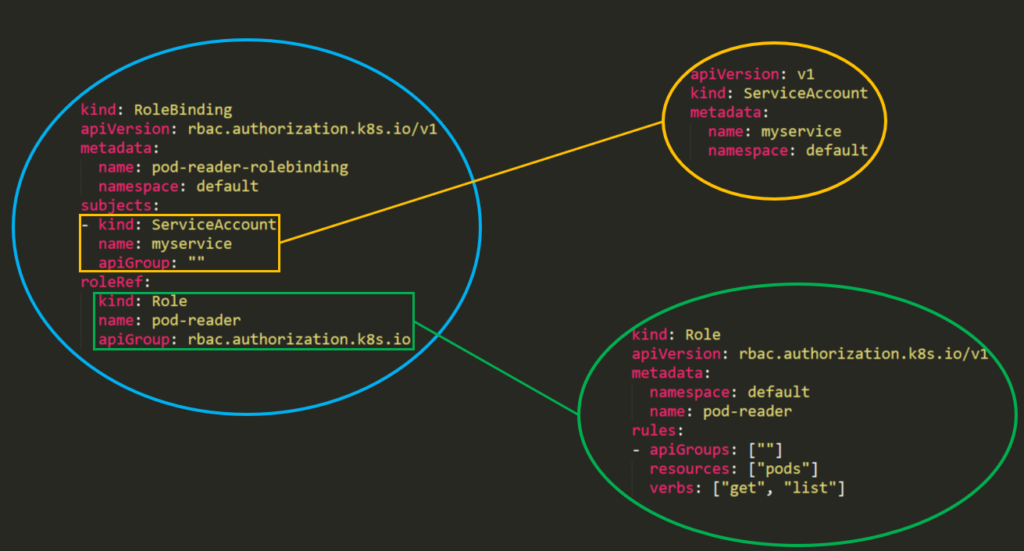
“Roles” 和 “ClusterRoles” 的区别只在于 role 会应用在哪里 —— “Role” 只会授予对 one 个 specific namespace 的 access,而 “ClusterRole” 可以在 cluster 的 all namespaces 中使用。此外,ClusterRoles 也可以授予对以下内容的 access:
- cluster-scoped resources(例如 nodes)。
- non-resource endpoints(例如 /healthz)。
- namespaced resources(例如 Pods),across all namespaces。
从 Kubernetes 1.6 开始,RBAC policies 默认是 enabled 的。但要启用 RBAC,你可以使用类似这样的方式:
kube-apiserver --authorization-mode=Example,RBAC --other-options --more-options
现代集群也可以使用 --authorization-config 配置 API server authorizer 链,该参数指向一个 AuthorizationConfiguration 文件。这个文件可以定义有序的 authorizers、多个 webhook authorizers、webhook 超时、failurePolicy、缓存设置,以及决定哪些请求会发送到 webhook 的 CEL matchConditions。在安全审查中,如果存在 --authorization-config,不要只看 --authorization-mode:读取引用的文件,并检查 webhook 是否可以在 NoOpinion 时 fail open,matchConditions 是否会跳过敏感资源,以及所有 API server 副本是否使用等价的 authorization 配置。
在审查匿名 API 暴露时,也要检查 authentication 配置。--authentication-config 可以将 anonymous authenticator 限定到特定路径,例如 /livez、/readyz 和 /healthz。匿名 health endpoint 访问并不等同于对 Kubernetes 资源的匿名访问;危险情况是存在某条 RBAC 或 authorizer 路径,让 system:anonymous 或 system:unauthenticated 读取或修改真实的 API 对象。
最后,把 system:masters 中的成员资格视为 cluster-admin 等价。属于这个组的用户或证书拥有不受限制的 API 访问权限,会绕过正常的 RBAC 和 webhook authorization 限制,因此,添加这个组的身份映射可能比普通的 RoleBinding 输出更重要。
Templates
在 Role 或 ClusterRole 的 template 中,你需要指定 role 的名称、namespace(在 roles 中),然后是 role 的 apiGroups、resources 和 verbs:
- apiGroups 是一个数组,包含此规则适用的不同 API namespaces。例如,Pod 定义使用 apiVersion: v1。它可以具有诸如 rbac.authorization.k8s.io 或 [*] 这样的值。_
- resources 是一个数组,定义此规则适用于哪些资源。你可以使用以下命令查看所有资源:
kubectl api-resources --namespaced=true - verbs 是一个数组,包含允许的动词。Kubernetes 中的 verb 定义了你需要对资源执行的操作类型。例如,list verb 用于资源集合,而 "get" 用于单个资源。
Rules Verbs
(This info was taken from the docs)
| HTTP verb | request verb |
|---|---|
| POST | create |
| GET, HEAD | get (for individual resources), list (for collections, including full object content), watch (for watching an individual resource or collection of resources) |
| PUT | update |
| PATCH | patch |
| DELETE | delete (for individual resources), deletecollection (for collections) |
Kubernetes 有时会使用专门的 verbs 通过额外权限进行 authorization。例如:
- PodSecurityPolicy
policyAPI group 中podsecuritypoliciesresources 上的useverb。- RBAC
rbac.authorization.k8s.ioAPI group 中roles和clusterrolesresources 上的bind和escalateverbs。- Authentication
- core API group 中
users、groups和serviceaccounts上的impersonateverb,以及authentication.k8s.ioAPI group 中的userextras。
Kubernetes v1.36 也将 constrained impersonation 作为 beta feature 引入。集群不再只授予传统的全有或全无 impersonate verb,而是可以授予特定模式的 verbs,例如 impersonate:user-info、impersonate:serviceaccount、impersonate:arbitrary-node 或 impersonate:associated-node,以及目标资源上的特定操作 verbs,例如 impersonate-on:user-info:list。审查时要同时看两部分:subject 可以 impersonate 的身份,以及 impersonating 时它能够执行的操作。传统的 impersonate rules 仍然可能允许更广泛的访问,因此,除非 API server 版本和 access-review 证据确认,否则不要假设看起来受限的 verbs 一定会被强制执行。
Warning
你可以通过执行
kubectl api-resources --sort-by name -o wide找到每个 resource 支持的所有 verbs
Examples
apiVersion: rbac.authorization.k8s.io/v1
kind: Role
metadata:
namespace: defaultGreen
name: pod-and-pod-logs-reader
rules:
- apiGroups: [""]
resources: ["pods", "pods/log"]
verbs: ["get", "list", "watch"]
apiVersion: rbac.authorization.k8s.io/v1
kind: ClusterRole
metadata:
# "namespace" omitted since ClusterRoles are not namespaced
name: secret-reader
rules:
- apiGroups: [""]
resources: ["secrets"]
verbs: ["get", "watch", "list"]
例如,你可以使用一个 ClusterRole 来允许某个特定用户运行:
kubectl get pods --all-namespaces
RoleBinding 和 ClusterRoleBinding
来自 docs: role binding 会将 role 中定义的权限授予一个 user 或一组 users。它保存一个 subjects 列表(users、groups 或 service accounts),以及被授予的 role 的引用。RoleBinding 在特定的 namespace 内授予权限,而 ClusterRoleBinding 则在 cluster-wide 范围内授予该访问权限。
apiVersion: rbac.authorization.k8s.io/v1
# This role binding allows "jane" to read pods in the "default" namespace.
# You need to already have a Role named "pod-reader" in that namespace.
kind: RoleBinding
metadata:
name: read-pods
namespace: default
subjects:
# You can specify more than one "subject"
- kind: User
name: jane # "name" is case sensitive
apiGroup: rbac.authorization.k8s.io
roleRef:
# "roleRef" specifies the binding to a Role / ClusterRole
kind: Role #this must be Role or ClusterRole
name: pod-reader # this must match the name of the Role or ClusterRole you wish to bind to
apiGroup: rbac.authorization.k8s.io
apiVersion: rbac.authorization.k8s.io/v1
# This cluster role binding allows anyone in the "manager" group to read secrets in any namespace.
kind: ClusterRoleBinding
metadata:
name: read-secrets-global
subjects:
- kind: Group
name: manager # Name is case sensitive
apiGroup: rbac.authorization.k8s.io
roleRef:
kind: ClusterRole
name: secret-reader
apiGroup: rbac.authorization.k8s.io
Permissions 是 additive,所以如果你有一个具有“list”和“delete” secrets 的 clusterRole,你可以通过一个具有“get”的 Role 来添加它。因此要注意,并始终测试你的 roles 和 permissions,并且 明确 specify 什么是 ALLOWED,因为默认情况下 everything is DENIED。
值得检查的细节
RBAC 使用资源名称时,采用的是它们在 API URLs 中出现的形式,而不是 YAML 的 kind。Pod 是 pods,Deployment 是 deployments,而 subresources 会用斜杠表示,例如 pods/log、pods/exec、pods/portforward、pods/ephemeralcontainers、deployments/scale、serviceaccounts/token、nodes/proxy 或 services/proxy。对 pods 的 permission 不会自动授予对 pods/exec 或 pods/log 的访问权限。
resourceNames 可以将某些 requests 限制为特定的 object names:
rules:
- apiGroups: [""]
resources: ["configmaps"]
resourceNames: ["app-config"]
verbs: ["get", "update"]
这不会按名称限制顶层的 create 或 deletecollection。对于 list 和 watch,客户端必须包含匹配的 metadata.name 字段选择器,否则该请求不会被该规则授权:
kubectl get configmaps -n default --field-selector=metadata.name=app-config
使用 exact access reviews 进行高影响检查:
kubectl auth can-i create pods/exec -n default
kubectl auth can-i create serviceaccounts/token -n default
kubectl auth can-i impersonate users
kubectl auth can-i bind clusterroles.rbac.authorization.k8s.io
kubectl auth can-i escalate clusterroles.rbac.authorization.k8s.io
kubectl auth can-i impersonate-on:user-info:list pods -n default
枚举 RBAC
# Get current privileges
kubectl auth can-i --list
# use `--as=system:serviceaccount:<namespace>:<sa_name>` to impersonate a service account

# List Cluster Roles
kubectl get clusterroles
kubectl describe clusterroles

# List Cluster Roles Bindings
kubectl get clusterrolebindings
kubectl describe clusterrolebindings

# List Roles
kubectl get roles
kubectl describe roles

# List Roles Bindings
kubectl get rolebindings
kubectl describe rolebindings
滥用 Role/ClusterRoles 进行权限提升
{{#ref}} abusing-roles-clusterroles-in-kubernetes/ {{#endref}}
{{#include ../../banners/hacktricks-training.md}}