mirror of
https://github.com/HackTricks-wiki/hacktricks-cloud.git
synced 2025-12-23 07:29:04 -08:00

171 lines
13 KiB
Markdown
171 lines
13 KiB
Markdown
# GCP - IAM Privesc
|
|
|
|
{% hint style="success" %}
|
|
Learn & practice AWS Hacking:<img src="../../../.gitbook/assets/image (1) (1) (1) (1).png" alt="" data-size="line">[**HackTricks Training AWS Red Team Expert (ARTE)**](https://training.hacktricks.xyz/courses/arte)<img src="../../../.gitbook/assets/image (1) (1) (1) (1).png" alt="" data-size="line">\
|
|
Learn & practice GCP Hacking: <img src="../../../.gitbook/assets/image (2) (1).png" alt="" data-size="line">[**HackTricks Training GCP Red Team Expert (GRTE)**<img src="../../../.gitbook/assets/image (2) (1).png" alt="" data-size="line">](https://training.hacktricks.xyz/courses/grte)
|
|
|
|
<details>
|
|
|
|
<summary>Support HackTricks</summary>
|
|
|
|
* Check the [**subscription plans**](https://github.com/sponsors/carlospolop)!
|
|
* **Join the** 💬 [**Discord group**](https://discord.gg/hRep4RUj7f) or the [**telegram group**](https://t.me/peass) or **follow** us on **Twitter** 🐦 [**@hacktricks\_live**](https://twitter.com/hacktricks_live)**.**
|
|
* **Share hacking tricks by submitting PRs to the** [**HackTricks**](https://github.com/carlospolop/hacktricks) and [**HackTricks Cloud**](https://github.com/carlospolop/hacktricks-cloud) github repos.
|
|
|
|
</details>
|
|
{% endhint %}
|
|
|
|
## IAM
|
|
|
|
Find more information about IAM in:
|
|
|
|
{% content-ref url="../gcp-services/gcp-iam-and-org-policies-enum.md" %}
|
|
[gcp-iam-and-org-policies-enum.md](../gcp-services/gcp-iam-and-org-policies-enum.md)
|
|
{% endcontent-ref %}
|
|
|
|
### `iam.roles.update` (`iam.roles.get`)
|
|
|
|
An attacker with the mentioned permissions will be able to update a role assigned to you and give you extra permissions to other resources like:
|
|
|
|
```bash
|
|
gcloud iam roles update <rol name> --project <project> --add-permissions <permission>
|
|
```
|
|
|
|
You can find a script to automate the **creation, exploit and cleaning of a vuln environment here** and a python script to abuse this privilege [**here**](https://github.com/RhinoSecurityLabs/GCP-IAM-Privilege-Escalation/blob/master/ExploitScripts/iam.roles.update.py). For more information check the [**original research**](https://rhinosecuritylabs.com/gcp/privilege-escalation-google-cloud-platform-part-1/).
|
|
|
|
### `iam.serviceAccounts.getAccessToken` (`iam.serviceAccounts.get`)
|
|
|
|
An attacker with the mentioned permissions will be able to **request an access token that belongs to a Service Account**, so it's possible to request an access token of a Service Account with more privileges than ours.
|
|
|
|
```bash
|
|
gcloud --impersonate-service-account="${victim}@${PROJECT_ID}.iam.gserviceaccount.com" \
|
|
auth print-access-token
|
|
```
|
|
|
|
You can find a script to automate the [**creation, exploit and cleaning of a vuln environment here**](https://github.com/carlospolop/gcp_privesc_scripts/blob/main/tests/4-iam.serviceAccounts.getAccessToken.sh) and a python script to abuse this privilege [**here**](https://github.com/RhinoSecurityLabs/GCP-IAM-Privilege-Escalation/blob/master/ExploitScripts/iam.serviceAccounts.getAccessToken.py). For more information check the [**original research**](https://rhinosecuritylabs.com/gcp/privilege-escalation-google-cloud-platform-part-1/).
|
|
|
|
### `iam.serviceAccountKeys.create`
|
|
|
|
An attacker with the mentioned permissions will be able to **create a user-managed key for a Service Account**, which will allow us to access GCP as that Service Account.
|
|
|
|
```bash
|
|
gcloud iam service-accounts keys create --iam-account <name> /tmp/key.json
|
|
|
|
gcloud auth activate-service-account --key-file=sa_cred.json
|
|
```
|
|
|
|
You can find a script to automate the [**creation, exploit and cleaning of a vuln environment here**](https://github.com/carlospolop/gcp_privesc_scripts/blob/main/tests/3-iam.serviceAccountKeys.create.sh) and a python script to abuse this privilege [**here**](https://github.com/RhinoSecurityLabs/GCP-IAM-Privilege-Escalation/blob/master/ExploitScripts/iam.serviceAccountKeys.create.py). For more information check the [**original research**](https://rhinosecuritylabs.com/gcp/privilege-escalation-google-cloud-platform-part-1/).
|
|
|
|
Note that **`iam.serviceAccountKeys.update` won't work to modify the key** of a SA because to do that the permissions `iam.serviceAccountKeys.create` is also needed.
|
|
|
|
### `iam.serviceAccounts.implicitDelegation`
|
|
|
|
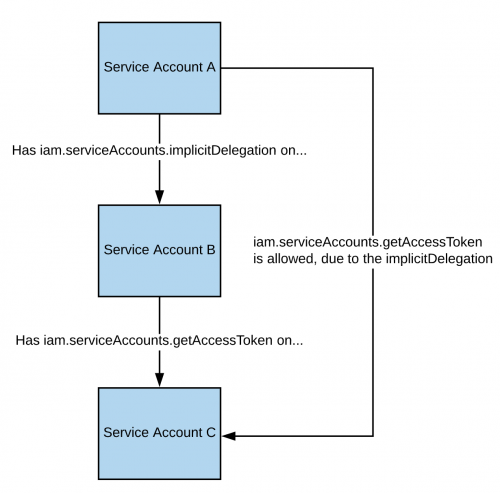
If you have the **`iam.serviceAccounts.implicitDelegation`** permission on a Service Account that has the **`iam.serviceAccounts.getAccessToken`** permission on a third Service Account, then you can use implicitDelegation to **create a token for that third Service Account**. Here is a diagram to help explain.
|
|
|
|
|
|
|
|
Note that according to the [**documentation**](https://cloud.google.com/iam/docs/understanding-service-accounts), the delegation of `gcloud` only works to generate a token using the [**generateAccessToken()**](https://cloud.google.com/iam/credentials/reference/rest/v1/projects.serviceAccounts/generateAccessToken) method. So here you have how to get a token using the API directly:
|
|
|
|
```bash
|
|
curl -X POST \
|
|
'https://iamcredentials.googleapis.com/v1/projects/-/serviceAccounts/'"${TARGET_SERVICE_ACCOUNT}"':generateAccessToken' \
|
|
-H 'Content-Type: application/json' \
|
|
-H 'Authorization: Bearer '"$(gcloud auth print-access-token)" \
|
|
-d '{
|
|
"delegates": ["projects/-/serviceAccounts/'"${DELEGATED_SERVICE_ACCOUNT}"'"],
|
|
"scope": ["https://www.googleapis.com/auth/cloud-platform"]
|
|
}'
|
|
```
|
|
|
|
You can find a script to automate the [**creation, exploit and cleaning of a vuln environment here**](https://github.com/carlospolop/gcp_privesc_scripts/blob/main/tests/5-iam.serviceAccounts.implicitDelegation.sh) and a python script to abuse this privilege [**here**](https://github.com/RhinoSecurityLabs/GCP-IAM-Privilege-Escalation/blob/master/ExploitScripts/iam.serviceAccounts.implicitDelegation.py). For more information check the [**original research**](https://rhinosecuritylabs.com/gcp/privilege-escalation-google-cloud-platform-part-1/).
|
|
|
|
### `iam.serviceAccounts.signBlob`
|
|
|
|
An attacker with the mentioned permissions will be able to **sign of arbitrary payloads in GCP**. So it'll be possible to **create an unsigned JWT of the SA and then send it as a blob to get the JWT signed** by the SA we are targeting. For more information [**read this**](https://medium.com/google-cloud/using-serviceaccountactor-iam-role-for-account-impersonation-on-google-cloud-platform-a9e7118480ed).
|
|
|
|
You can find a script to automate the [**creation, exploit and cleaning of a vuln environment here**](https://github.com/carlospolop/gcp_privesc_scripts/blob/main/tests/6-iam.serviceAccounts.signBlob.sh) and a python script to abuse this privilege [**here**](https://github.com/RhinoSecurityLabs/GCP-IAM-Privilege-Escalation/blob/master/ExploitScripts/iam.serviceAccounts.signBlob-accessToken.py) and [**here**](https://github.com/RhinoSecurityLabs/GCP-IAM-Privilege-Escalation/blob/master/ExploitScripts/iam.serviceAccounts.signBlob-gcsSignedUrl.py). For more information check the [**original research**](https://rhinosecuritylabs.com/gcp/privilege-escalation-google-cloud-platform-part-1/).
|
|
|
|
### `iam.serviceAccounts.signJwt`
|
|
|
|
An attacker with the mentioned permissions will be able to **sign well-formed JSON web tokens (JWTs)**. The difference with the previous method is that **instead of making google sign a blob containing a JWT, we use the signJWT method that already expects a JWT**. This makes it easier to use but you can only sign JWT instead of any bytes.
|
|
|
|
You can find a script to automate the [**creation, exploit and cleaning of a vuln environment here**](https://github.com/carlospolop/gcp_privesc_scripts/blob/main/tests/7-iam.serviceAccounts.signJWT.sh) and a python script to abuse this privilege [**here**](https://github.com/RhinoSecurityLabs/GCP-IAM-Privilege-Escalation/blob/master/ExploitScripts/iam.serviceAccounts.signJWT.py). For more information check the [**original research**](https://rhinosecuritylabs.com/gcp/privilege-escalation-google-cloud-platform-part-1/).
|
|
|
|
### `iam.serviceAccounts.setIamPolicy` <a href="#iam.serviceaccounts.setiampolicy" id="iam.serviceaccounts.setiampolicy"></a>
|
|
|
|
An attacker with the mentioned permissions will be able to **add IAM policies to service accounts**. You can abuse it to **grant yourself** the permissions you need to impersonate the service account. In the following example we are granting ourselves the `roles/iam.serviceAccountTokenCreator` role over the interesting SA:
|
|
|
|
```bash
|
|
gcloud iam service-accounts add-iam-policy-binding "${VICTIM_SA}@${PROJECT_ID}.iam.gserviceaccount.com" \
|
|
--member="user:username@domain.com" \
|
|
--role="roles/iam.serviceAccountTokenCreator"
|
|
|
|
# If you still have prblem grant yourself also this permission
|
|
gcloud iam service-accounts add-iam-policy-binding "${VICTIM_SA}@${PROJECT_ID}.iam.gserviceaccount.com" \ \
|
|
--member="user:username@domain.com" \
|
|
--role="roles/iam.serviceAccountUser"
|
|
```
|
|
|
|
You can find a script to automate the [**creation, exploit and cleaning of a vuln environment here**](https://github.com/carlospolop/gcp_privesc_scripts/blob/main/tests/d-iam.serviceAccounts.setIamPolicy.sh)**.**
|
|
|
|
### `iam.serviceAccounts.actAs`
|
|
|
|
The **iam.serviceAccounts.actAs permission** is like the **iam:PassRole permission from AWS**. It's essential for executing tasks, like initiating a Compute Engine instance, as it grants the ability to "actAs" a Service Account, ensuring secure permission management. Without this, users might gain undue access. Additionally, exploiting the **iam.serviceAccounts.actAs** involves various methods, each requiring a set of permissions, contrasting with other methods that need just one.
|
|
|
|
#### Service account impersonation <a href="#service-account-impersonation" id="service-account-impersonation"></a>
|
|
|
|
Impersonating a service account can be very useful to **obtain new and better privileges**. There are three ways in which you can [impersonate another service account](https://cloud.google.com/iam/docs/understanding-service-accounts#impersonating_a_service_account):
|
|
|
|
* Authentication **using RSA private keys** (covered above)
|
|
* Authorization **using Cloud IAM policies** (covered here)
|
|
* **Deploying jobs on GCP services** (more applicable to the compromise of a user account)
|
|
|
|
### `iam.serviceAccounts.getOpenIdToken`
|
|
|
|
An attacker with the mentioned permissions will be able to generate an OpenID JWT. These are used to assert identity and do not necessarily carry any implicit authorization against a resource.
|
|
|
|
According to this [**interesting post**](https://medium.com/google-cloud/authenticating-using-google-openid-connect-tokens-e7675051213b), it's necessary to indicate the audience (service where you want to use the token to authenticate to) and you will receive a JWT signed by google indicating the service account and the audience of the JWT.
|
|
|
|
You can generate an OpenIDToken (if you have the access) with:
|
|
|
|
```bash
|
|
# First activate the SA with iam.serviceAccounts.getOpenIdToken over the other SA
|
|
gcloud auth activate-service-account --key-file=/path/to/svc_account.json
|
|
# Then, generate token
|
|
gcloud auth print-identity-token "${ATTACK_SA}@${PROJECT_ID}.iam.gserviceaccount.com" --audiences=https://example.com
|
|
```
|
|
|
|
Then you can just use it to access the service with:
|
|
|
|
```bash
|
|
curl -v -H "Authorization: Bearer id_token" https://some-cloud-run-uc.a.run.app
|
|
```
|
|
|
|
Some services that support authentication via this kind of tokens are:
|
|
|
|
* [Google Cloud Run](https://cloud.google.com/run/)
|
|
* [Google Cloud Functions](https://cloud.google.com/functions/docs/)
|
|
* [Google Identity Aware Proxy](https://cloud.google.com/iap/docs/authentication-howto)
|
|
* [Google Cloud Endpoints](https://cloud.google.com/endpoints/docs/openapi/authenticating-users-google-id) (if using Google OIDC)
|
|
|
|
You can find an example on how to create and OpenID token behalf a service account [**here**](https://github.com/carlospolop-forks/GCP-IAM-Privilege-Escalation/blob/master/ExploitScripts/iam.serviceAccounts.getOpenIdToken.py).
|
|
|
|
## References
|
|
|
|
* [https://rhinosecuritylabs.com/gcp/privilege-escalation-google-cloud-platform-part-1/](https://rhinosecuritylabs.com/gcp/privilege-escalation-google-cloud-platform-part-1/)
|
|
|
|
{% hint style="success" %}
|
|
Learn & practice AWS Hacking:<img src="../../../.gitbook/assets/image (1) (1) (1) (1).png" alt="" data-size="line">[**HackTricks Training AWS Red Team Expert (ARTE)**](https://training.hacktricks.xyz/courses/arte)<img src="../../../.gitbook/assets/image (1) (1) (1) (1).png" alt="" data-size="line">\
|
|
Learn & practice GCP Hacking: <img src="../../../.gitbook/assets/image (2) (1).png" alt="" data-size="line">[**HackTricks Training GCP Red Team Expert (GRTE)**<img src="../../../.gitbook/assets/image (2) (1).png" alt="" data-size="line">](https://training.hacktricks.xyz/courses/grte)
|
|
|
|
<details>
|
|
|
|
<summary>Support HackTricks</summary>
|
|
|
|
* Check the [**subscription plans**](https://github.com/sponsors/carlospolop)!
|
|
* **Join the** 💬 [**Discord group**](https://discord.gg/hRep4RUj7f) or the [**telegram group**](https://t.me/peass) or **follow** us on **Twitter** 🐦 [**@hacktricks\_live**](https://twitter.com/hacktricks_live)**.**
|
|
* **Share hacking tricks by submitting PRs to the** [**HackTricks**](https://github.com/carlospolop/hacktricks) and [**HackTricks Cloud**](https://github.com/carlospolop/hacktricks-cloud) github repos.
|
|
|
|
</details>
|
|
{% endhint %}
|